 DVDneXtCOPY Blu-ray Ripper
HD DVD vs Blu-ray: Key Differences and Why Blu-ray Won

Summary: HD DVD was Blu-ray's main rival in the mid-2000s high-definition disc war. Both used blue-violet laser technology and supported HD movie playback, but Blu-ray offered 25GB/50GB capacity versus HD DVD's 15GB/30GB, while HD DVD was designed to reuse more of the existing DVD manufacturing structure. Blu-ray ultimately gained the stronger combination of hardware adoption, studio support, and retail momentum, and Toshiba ended the HD DVD business in 2008.
Table of Contents
HD DVD was Blu-ray's main rival during the high-definition optical-disc format war of the mid-2000s. Both formats were designed to bring HD movies to physical discs, but Blu-ray offered more capacity, while HD DVD emphasized compatibility with existing DVD manufacturing and lower production barriers.
There is no current format war to settle. Toshiba ended the HD DVD business in 2008, leaving Blu-ray as the surviving mainstream HD optical-disc format. HD DVD is now mainly relevant to people who still own the discs, compatible legacy hardware, or editions they want to preserve.
HD DVD vs Blu-ray: Quick Comparison
The clearest HD DVD vs Blu-ray difference during the actual format war was disc capacity. HD DVD-ROM used 15GB single-layer and 30GB dual-layer discs, while standard Blu-ray offered 25GB and 50GB. Both were high-definition formats; 4K Ultra HD Blu-ray came later and should not be mixed into a comparison of the formats that competed in the 2000s.
HD DVD was also Blu-ray's main competitor, not an upgraded version of ordinary DVD or a type of Blu-ray. The two formats required different playback hardware and followed different physical-disc designs even though both relied on blue-violet optical technology.
| Feature | HD DVD | Standard Blu-ray |
|---|---|---|
| Main ecosystem | Toshiba / DVD Forum | Blu-ray Disc Association |
| Common movie capacity | 15GB single layer / 30GB dual layer | 25GB single layer / 50GB dual layer |
| HD video | 1920×1080 HD content; 1080p output supported by compatible HD DVD hardware | Up to 1080p Full HD |
| Laser | Blue-violet, 405nm | Blue-violet |
| Disc design | 0.6mm + 0.6mm bonded structure similar to DVD | Higher-density Blu-ray structure |
| Player requirement | HD DVD-compatible hardware | Blu-ray-compatible hardware |
| Main historical advantage | Easier transition from existing DVD manufacturing | More storage capacity |
| Format-war result | Toshiba discontinued the business in 2008 | Became the surviving mainstream HD disc format |
Toshiba's original next-generation disc proposal used a 405nm blue-violet laser and a DVD-like bonded-disc structure. The common claim that HD DVD used a red laser is therefore incorrect.
Blu-ray's larger capacity gave publishers more room for video, audio tracks, alternate languages, and extras. It did not guarantee that every Blu-ray edition automatically looked or sounded better than the HD DVD release of the same movie; the source master and the way each edition was authored still mattered.
HD DVD vs Blu-ray: Key Technical Differences
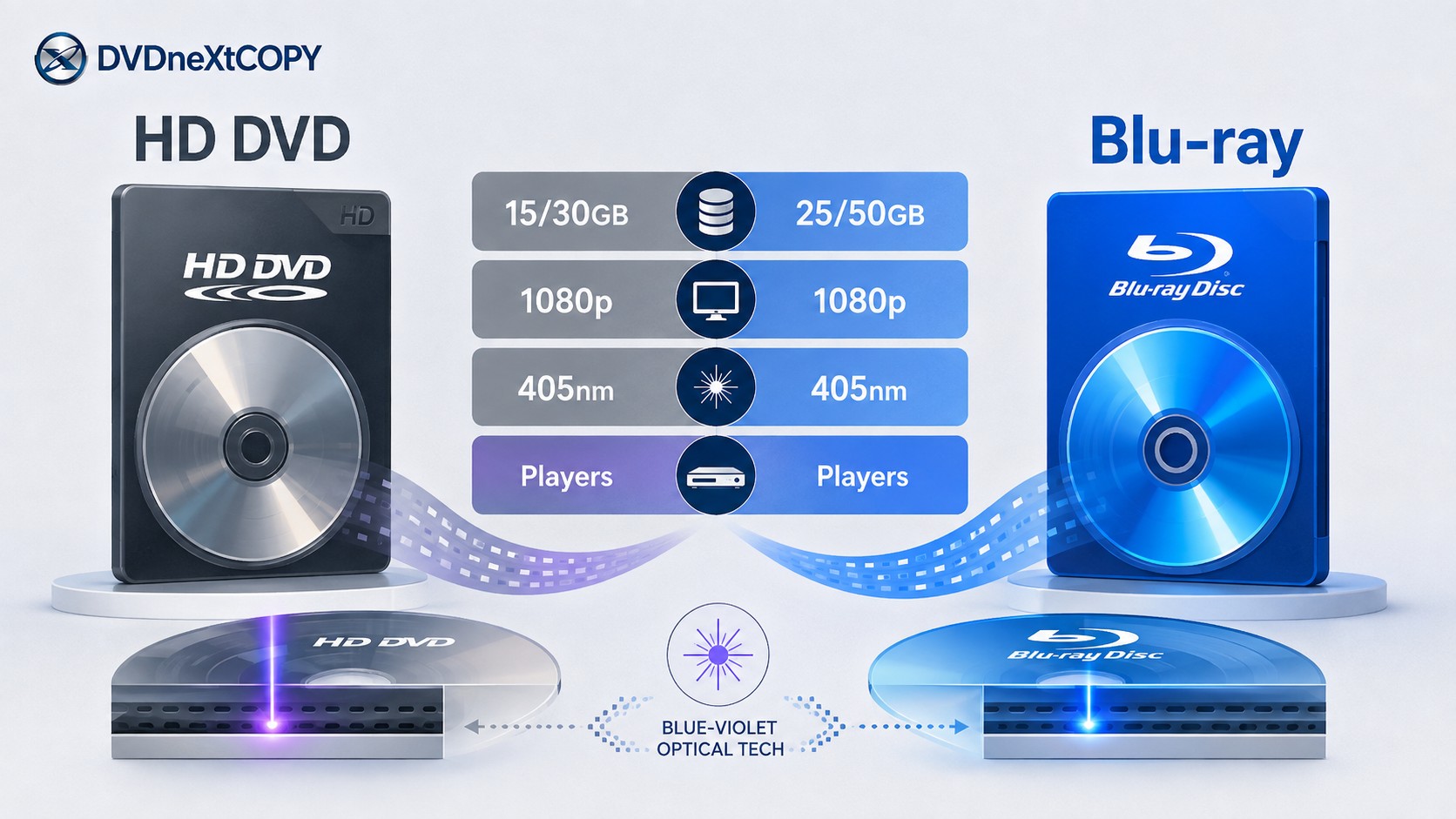
Storage Capacity: 15/30GB vs 25/50GB
HD DVD-ROM was designed for 15GB on a single layer and 30GB on a dual-layer disc. That was considerably more than conventional DVD and enough to make HD DVD a genuine high-definition movie format.
Standard Blu-ray provided 25GB on a single layer and 50GB on two layers. Those are the Blu-ray capacities that belong in a historical comparison with HD DVD. Later developments such as BDXL and Ultra HD Blu-ray were not part of the original format-war comparison.
The capacity difference gave Blu-ray more headroom for higher video bitrates, several audio tracks, alternate languages, and bonus material. Capacity alone still did not determine the quality of an individual release. A good master and careful encoding could matter more than unused space on the disc.
Video Quality, Codecs, and Audio
HD DVD was a genuine high-definition format rather than an intermediate step between DVD and Blu-ray. Compatible HD DVD equipment supported 1920×1080 content and 1080p output, while standard Blu-ray also delivered Full HD 1080p video.
The two formats also shared several important video-compression technologies. HD DVD specifications adopted MPEG-2 along with more efficient MPEG-4 AVC/H.264 and VC-1-family codecs, while Blu-ray could likewise use MPEG-2, H.264/AVC, and VC-1. The codec and bitrate selected for an individual release therefore mattered alongside disc capacity.
Both formats also supported more advanced home-theater audio than conventional DVD. HD DVD hardware supported formats such as Dolby Digital Plus, Dolby TrueHD, DTS-HD, and multichannel LPCM, while Blu-ray also offered high-quality multichannel soundtrack options.
For two editions of the same movie, the better comparison is the actual master, video encode, soundtrack, extras, and authoring. The Blu-ray logo by itself does not prove that a particular release must look better than its HD DVD counterpart.
Laser Technology and Disc Design
Both HD DVD and Blu-ray moved beyond the red-laser technology associated with conventional DVD. Toshiba and NEC's proposal for the format that became HD DVD specified a 405nm blue-violet laser, so describing HD DVD as a red-laser format is inaccurate.
The more useful distinction is the physical disc design. HD DVD deliberately kept a structure similar to conventional DVD, using two 0.6mm layers bonded together. Toshiba promoted this as a way for manufacturers to reuse more existing DVD production equipment and reduce the cost of switching to the new format.
Blu-ray followed a different higher-density optical design and achieved the larger 25GB and 50GB capacities that became one of its most visible technical advantages.
The format war therefore was not a simple case of red laser versus blue laser. Both used blue-violet optical technology, but they made different choices about disc construction, data density, capacity, and compatibility with existing DVD manufacturing.
Players, Region Coding, and Compatibility
An HD DVD and a Blu-ray may have the same familiar optical-disc shape, but ordinary players for the two formats were not interchangeable. A normal Blu-ray Disc player does not read HD DVD, and an HD DVD player should not be assumed to read Blu-ray.
A small number of dual-format players existed during the format-war period, but those were specifically designed to support both formats. They were exceptions rather than evidence that standard Blu-ray and HD DVD hardware were cross-compatible.
Blu-ray movie releases may also use the Blu-ray region system, while HD DVD followed its own format rules. When dealing with legacy media, check the actual disc and playback hardware rather than assuming DVD, HD DVD, and Blu-ray use identical compatibility rules.
If you are considering used HD DVD equipment today, the condition of the hardware matters more than theoretical format specifications. Confirm that the player or drive still reads the discs you own and that its available video outputs work with your display before buying additional titles.
Why Did Blu-ray Win the Format War?
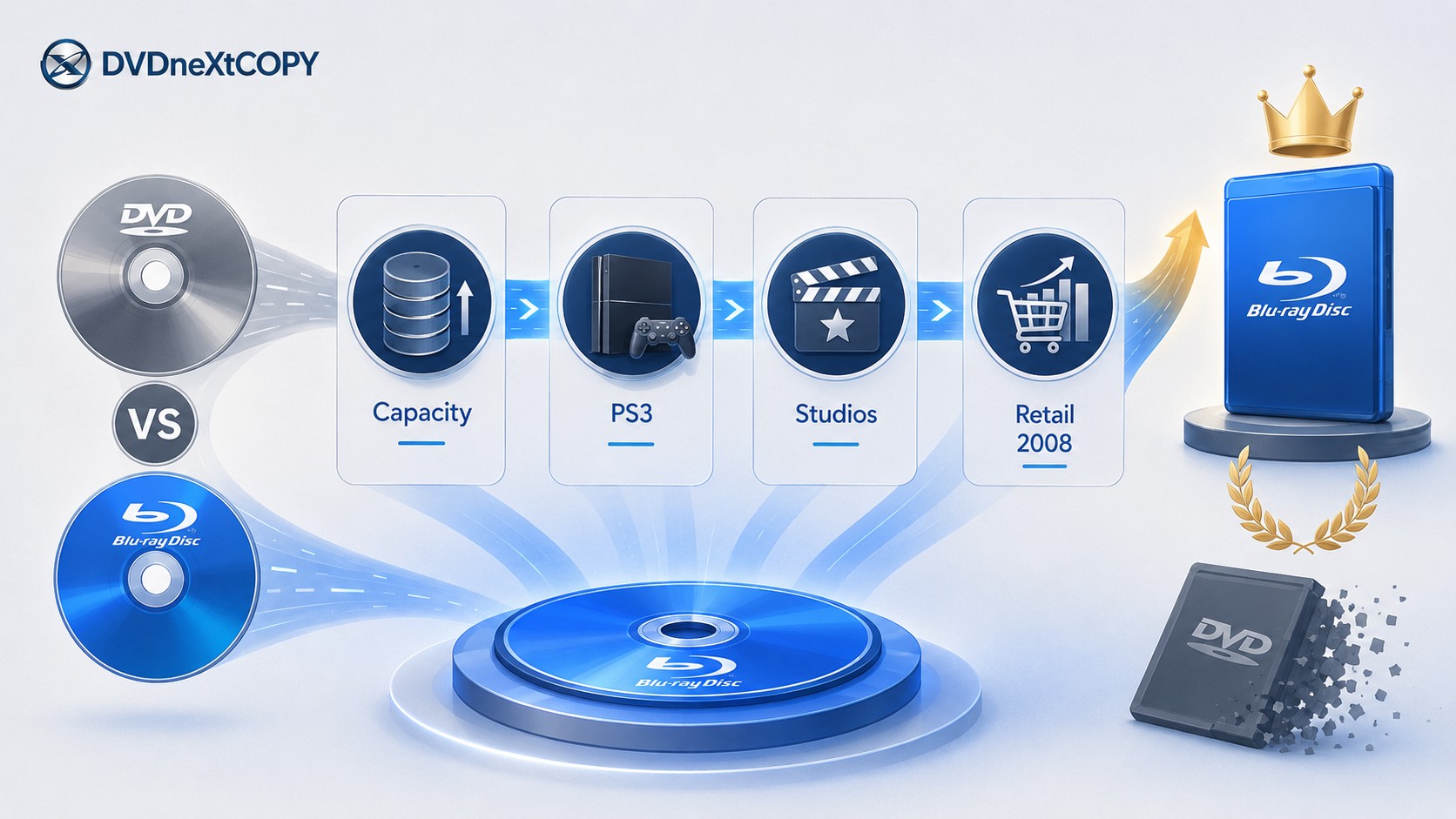
Blu-ray did not win because of a single specification. Its larger disc capacity mattered, but the result also depended on how much playback hardware reached consumers, which studios released movies on each format, and how retailers responded as industry support began to consolidate.
More Disc Capacity Gave Blu-ray More Headroom
Blu-ray's 25GB and 50GB capacities were substantially larger than HD DVD's 15GB and 30GB movie-disc capacities. That gave Blu-ray authors more space before they had to make decisions about video compression, soundtrack options, bonus features, or splitting content.
HD DVD's counterargument was economic rather than purely technical. Its DVD-like disc construction was designed to let manufacturers reuse more of their existing DVD production infrastructure. That made HD DVD a credible competitor even though Blu-ray could hold more data.
The capacity advantage helped Blu-ray, but it should not be presented as the single reason the format won.
PlayStation 3 Put Blu-ray Hardware in More Homes
Sony made Blu-ray part of its broader high-definition strategy before the format war was settled. PlayStation 3 included a Blu-ray drive, meaning that people buying the console also acquired hardware capable of playing Blu-ray media instead of necessarily purchasing a separate movie player.
That expanded the installed Blu-ray hardware base at an important time for both formats. Sony had explicitly identified the launch of PlayStation 3 as a starting point for expanding Blu-ray products and HD content.
PS3 was not the only reason Blu-ray won, but it gave Blu-ray another route into homes while HD DVD was still trying to expand its dedicated player base.
Studio and Retail Support Shifted Toward Blu-ray
A movie format is only useful when the titles people want are available on it. HD DVD had genuine studio backing early in the competition, including support from companies such as Warner Bros., Paramount, Universal, and New Line.
The competitive balance shifted as more content support consolidated around Blu-ray. Warner Bros. announced in January 2008 that it would move away from HD DVD and support Blu-ray exclusively, a decision Toshiba publicly described at the time as a major surprise.
That change mattered beyond one studio catalog. When consumers, retailers, hardware makers, and studios all have to choose between incompatible formats, a major content shift can influence which products receive shelf space and which hardware consumers are willing to buy.
Warner's Decision and Toshiba's 2008 Withdrawal
The end came quickly. On February 19, 2008, Toshiba announced that it would stop new development and production of HD DVD players and recorders, reduce shipments, and aim to end the business by the end of March. It also decided to end volume production of HD DVD drives used in areas such as PCs and games.
Toshiba's own explanation makes the outcome clearer than a simple specification scoreboard. The company said Warner Bros.' change of policy had broad effects, including an impact on major U.S. retailers, and concluded that there was no longer a realistic path to winning the competition.
Blu-ray therefore won through a combination of factors: more disc capacity, a growing hardware base that included PlayStation 3, increasing studio support, retail momentum, and finally Toshiba's decision to end the competing HD DVD business.
HD DVD Today: Playback, Collecting, and Preservation
Can a Blu-ray Player Play HD DVD?
A standard Blu-ray player cannot play an HD DVD. Blu-ray and HD DVD were competing optical formats rather than two names for the same standard. HD DVD playback requires compatible HD DVD hardware unless the specific legacy player was deliberately built as a dual-format model.
If you still own HD DVD titles, a working HD DVD player or compatible legacy drive remains necessary. Toshiba ended mass production of HD DVD players, recorders, and drives in 2008, so the condition and reliability of surviving hardware are now important parts of maintaining an HD DVD collection.
A modern television can display the output from suitable legacy equipment when the connection and signal are compatible, but the television itself does not add HD DVD support. The disc must still be read and decoded by HD DVD-capable hardware.
Are HD DVD Discs Still Worth Keeping?
An HD DVD does not become worthless simply because the format lost the market. If an edition contains a transfer, soundtrack, bonus feature, or packaging you want to keep and you already have reliable playback hardware, there is no technical reason to discard it solely because Blu-ray became the surviving standard.
The limitation is future convenience. HD DVD has not been an active consumer hardware format since 2008, so replacing a failed player or drive is less straightforward than maintaining a Blu-ray setup.
Before buying a used HD DVD today, check the edition and the hardware together. An inexpensive disc is not especially useful without a reliable way to play it, while a unique edition may still deserve shelf space when you already own compatible equipment.
For routine physical-media playback, Blu-ray is easier to maintain because it remained the surviving HD optical-disc ecosystem after the format war.
Saving Blu-ray Movies as Digital Files with DVDneXtCOPY
DVDneXtCOPY Blu-ray Ripper provides a Windows option for saving Blu-ray content as digital files after the HD DVD comparison itself is settled. It can load a Blu-ray disc, ISO image, or Blu-ray folder, then lets you review the detected title and select the audio and subtitle tracks you want to keep before choosing a passthrough-style MKV or an encoded output.
The useful distinction here is Blu-ray preservation, not HD DVD compatibility. A passthrough MKV can retain selected existing encoded streams without another video encode, while an encoded profile creates a new video stream when a smaller file or different codec is more important. A normal MKV also does not reproduce the original interactive Blu-ray menu, and DVDneXtCOPY should not be treated as an HD DVD player or as a replacement for legacy HD DVD hardware.
FAQs
No. HD DVD was a separate high-definition optical-disc format developed as a next-generation successor to DVD. It retained important similarities to DVD's physical construction, but HD DVD movie discs required compatible HD DVD playback hardware.
Yes. HD DVD was a high-definition movie format, and compatible Toshiba HD DVD hardware supported 1080p output. It should not be described as ordinary DVD resolution or as a format inherently limited to 1080i.
No. HD DVD used blue-violet laser technology. Toshiba and NEC's original next-generation disc proposal specified a 405nm blue-violet laser, so the claim that HD DVD used the same red laser as conventional DVD is incorrect.
Manufacturing economics were only one part of the competition. Blu-ray combined greater disc capacity with a growing hardware base, stronger studio support, and increasing retail momentum. Toshiba later identified Warner Bros.' shift toward Blu-ray and its wider market effects as an important reason for ending the HD DVD business.
Conclusion
The HD DVD vs Blu-ray war ended in 2008. HD DVD was Blu-ray's main high-definition optical-disc competitor, using 15GB and 30GB movie discs and a design intended to retain more compatibility with DVD manufacturing. Standard Blu-ray offered larger 25GB and 50GB discs and eventually gained the stronger combination of hardware deployment, content support, and market momentum.
The result was commercial as well as technical. Blu-ray had a capacity advantage, PlayStation 3 expanded access to Blu-ray hardware, major studio support shifted, and Toshiba concluded after Warner Bros.' move toward Blu-ray that continuing HD DVD no longer made competitive sense.
For someone who still owns HD DVD titles, the useful question today is not which format will win. Check whether the edition contains something you still value and whether you have reliable hardware to play it. Blu-ray remains the surviving mainstream HD disc format, while HD DVD is now a legacy format with historical and collector value.
 Luna MillerOct 8, 2026
How to Block Someone on TikTok: App & Website Guide
 Luna MillerSep 21, 2026
10 Free Sites to Download Subtitles for Movies & TV Shows in 2026
 Luna MillerSep 17, 2026
How to Delete a TikTok Story in 5 Steps (2026)
 Luna MillerSep 16, 2026
How to Fix Cinavia Message Code 3: Start With the Source
![WinX DVD Author Review & Tutorial: Features, How to Use, and Limits [2026]](https://c.dvdnextcopy.com/uploads/images/17884278134315877-5212fbb54f6ef7f5e20bf1765fc74e79.jpg) Luna MillerSep 3, 2026
Luna MillerSep 3, 2026WinX DVD Author Review & Tutorial: Features, How to Use, and Limits [2026]
 Luna MillerAug 31, 2026
How to Rip a DVD with HandBrake in 2026: Steps, Settings & Limitations