 DVDneXtCOPY DVD Creator
WinX DVD Author Review & Tutorial: Features, How to Use, and Limits [2026]

Summary: WinX DVD Author remains a useful free option for Windows users who need basic DVD authoring with MP4, MKV and HEVC input, subtitles, PAL/NTSC output, drag-and-drop loading, and customizable title/chapter menus. Its main drawbacks are the aging 6.3.10 application build, a dated interface, Windows-only availability, and relatively basic menu and editing controls compared with newer DVD creators.
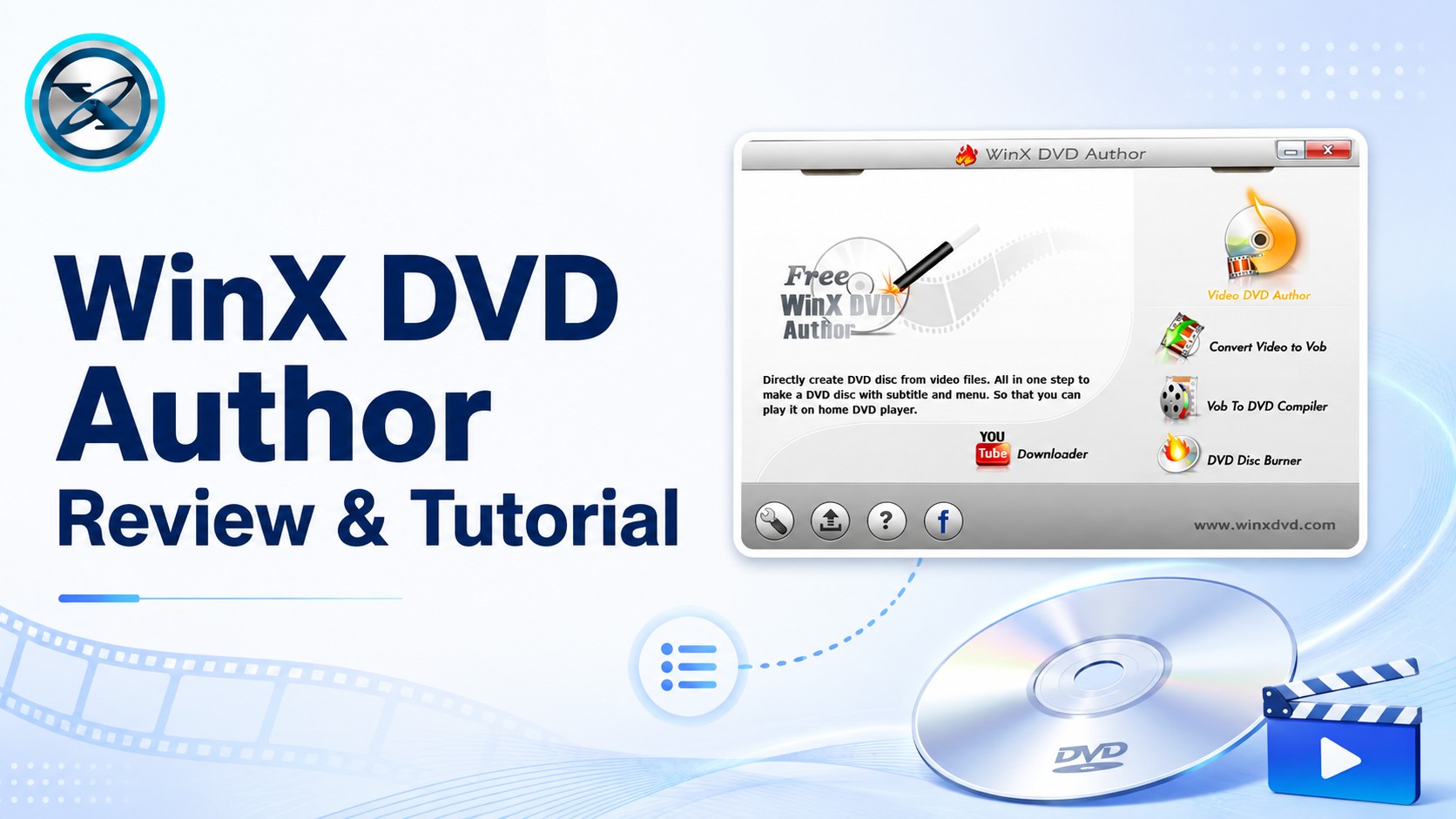
WinX DVD Author is a free Windows DVD creator software program for turning video files into playable DVD-Video discs with title menus, chapter menus, subtitles, background images, and music. It still supports common inputs such as MP4, MKV, MOV, AVI, and HEVC, while the finished disc can be authored for PAL or NTSC playback.
I focus on two questions in this review: whether WinX DVD Author is still practical to use today, and how to complete a DVD project with its current workflow. The tutorial below keeps the familiar six-step process, while the review sections separate the software's useful authoring features from the limitations of an application whose public installer is still listed as version 6.3.10.
Quick Verdict: Is WinX DVD Author Still Worth Using?
Yes, if you need a free and straightforward DVD authoring tool on Windows. WinX DVD Author still covers the essentials: multiple video inputs, DVD-5/DVD-9, PAL/NTSC, subtitles, title/chapter menus, custom background images and music, drag-and-drop loading, and playable DVD-Video output.
The main caveat is age. The current official product page is still maintained and lists Windows 11/10 support, but the public application build remains WinX DVD Author 6.3.10, originally released in 2019.
| Item | Current Status |
|---|---|
| Current listed app version | 6.3.10 |
| Build date | January 11, 2019 |
| Official product page | Still maintained in 2026 |
| OS | Windows 11/10 and earlier supported Windows versions |
| Price | Free |
| Watermark | No |
| Input | MP4, MKV, AVI, MOV, HEVC and more |
| DVD menu | Title/chapter menu, background image, music, text |
| Disc type | DVD-5 / DVD-9 |
| TV standard | PAL / NTSC |
| Mac version | No |
WinX DVD Author Review: Features and Limitations
WinX DVD Author converts regular video files into the DVD-Video structure required by standalone DVD players. It accepts formats such as MP4, MKV, AVI, MOV, WMV, MPEG, and HEVC, and it can work with more than one source video in the same project. Before authoring, you can trim clips, set 4:3 or 16:9 aspect ratio, add external SRT subtitles, choose PAL or NTSC, and select DVD-5 or DVD-9. It also creates both Title Menu and Chapter Menu screens, with options for background images, background music, text, font styling, and basic layout changes.
The software remains capable, but its authoring environment is visibly older than newer DVD creators. The menu editor provides useful customization, but it does not offer the deeper object-level design controls found in more advanced authoring tools. In the 6.3.10 interface screenshots used in this article, four built-in background choices are visible, although you can import your own image instead. Editing is focused on DVD preparation rather than full video editing, and WinX DVD Author remains Windows-only.

The built-in URL downloader is still available for supported online video sources, but it is a secondary feature rather than the main reason to choose WinX DVD Author.
Pros of WinX DVD Author
- It is an entirely free solution without hidden costs or limitations
- Features ease of use for beginners and novices with a user-friendly interface
- Generally produces high-quality DVDs with flexibility
- Supports YouTube downloading
- Excellent software and friendly professional customer support with a quick response time
- Offers extensive personalization choices
- Handles PAL and NTSC
- Integrates background music and design DVD covers
- Edit and enhance the content for high-quality output
- Compatible with almost all DVD players, including standard ones
- Works seamlessly with a large variety of video formats and files
Cons of WinX DVD Author
- Available only for Windows PC and is incompatible with Mac and Linux OS
- It takes a long installation time when initiating the software
- Outdated style and interface resembling the 2006 counterpart
- Lacks direct drag-and-drop functionality to load the source video files into the program
- It does not allow changing the playback button in the menu, lacks custom DVD menus
- The software often crashes when adding 4K video files
- Struggles with the newer video formats and file types
- Only 4 less-fashionable DVD menu templates are available, with no themes for holidays or other
- The burning process is often wrong and ejects the disc
- Usually, the end result lacks synchronization, where the sound and image do not run parallel
- The process of burning large video files can be time-consuming, and the software may freeze
- The software has ceased updating, and it was last updated in 2019, only to address bug fixes
How to Use WinX DVD Author: Step-by-Step Tutorial
Step 1: Download and Run WinX DVD Author
Download WinX DVD Author from the official Digiarty website and install it on your Windows PC. The current product is offered as free software without a watermark or usage limit.

Step 2: Insert a Blank DVD and Open Video DVD Author
Insert a writable DVD into the internal or external DVD burner. From the main WinX DVD Author window, select Video DVD Author to start a playable DVD-Video project.

Step 3: Add the Source Videos
Click the + button to import one or more videos, or drag and drop the files into the source list. Use the ordering controls to move clips up or down if you want them to appear in a specific sequence.
Click Subtitle beside a source video to open the subtitle settings and add an external SRT file when needed.
Step 4: Trim the Videos and Set DVD Parameters
Use Start Time and End Time to remove unwanted material from the beginning or end of a clip. Choose 4:3 for standard TV or 16:9 for widescreen playback, and enable letterboxing when the source needs it.
Open the parameter settings to choose NTSC or PAL and select DVD-5 for a single-layer disc or DVD-9 for a dual-layer disc. You can also adjust menu duration, safe-area settings, and subtitle parameters before continuing.

Step 5: Create the DVD Title Menu and Chapter Menu
Click the >> button to enter the menu editor. Choose a built-in background or import your own picture, then edit the Title Menu and Chapter Menu as needed.
Use the TT control to add text and edit its appearance. Add background music with the music control, and use the chapter tools to create or adjust chapter points. The menu customization is basic, but it covers the core elements needed for a home DVD project.

Step 6: Choose the DVD Output and Start Burning
Click >> again to open the DVD BUILDER window. Choose the output folder, PAL or NTSC format, encoder option, burner, and write settings, then click Start to begin authoring and burning the DVD.
What Happens to HD or 4K Video When You Burn It to DVD?
WinX DVD Author can accept HD, HEVC, and other high-resolution source files, but a standard DVD-Video disc does not remain HD or 4K. The source is converted to standard-definition DVD-Video during authoring.
| DVD Standard | DVD-Video Resolution |
|---|---|
| NTSC | 720 × 480 |
| PAL | 720 × 576 |
Using a 1080p or 4K source therefore does not create an HD or 4K DVD. The benefit is that WinX can accept those modern source files without requiring you to pre-convert them to DVD-compatible video first.
What Reviews Say About WinX DVD Author
A TechRadar review from 2017 described WinX DVD Author as a capable free DVD creator for users who do not need advanced authoring. It highlighted PAL/NTSC support and the built-in online-video downloader, while also reporting slow startup and compatibility problems with some MP4 files in that test environment. Because the review is old, those observations are better treated as historical experience than as a current benchmark.
Softpedia still lists WinX DVD Author as version 6.3.10, dated January 11, 2019, with a 3.7/5 user score from 132 votes. The more useful point is the build age: the public application has remained on the same version even though Digiarty continues to maintain its product page and list Windows 11 compatibility.
If You Need More Menu Control: DVDneXtCOPY DVD Creator
DVDneXtCOPY DVD Creator converts MP4, MKV, AVI, MOV, and more than 200 other video formats into DVD discs, ISO images, or DVD folders. Its menu workflow starts from categorized templates and lets you edit fonts, thumbnails, backgrounds, and other menu elements. Multiple source videos, audio/subtitle selection, disc-size settings, and real-time preview are also available.
Compared with WinX DVD Author, DVDneXtCOPY provides a broader template-oriented menu workflow, GPU acceleration, ISO/folder output in the same creation process, and more centralized authoring settings. It is a commercial Windows product with a trial, so it does not replace WinX's biggest advantage—being completely free—but it is better suited to users who want more menu flexibility and a guided authoring workflow.
| Feature | WinX DVD Author | DVDneXtCOPY DVD Creator |
|---|---|---|
| Price | Free | Trial / commercial |
| OS | Windows | Windows |
| Multiple videos | Yes | Yes |
| Title/chapter menus | Yes | Yes |
| Custom background/text | Yes | Yes |
| Menu workflow | Basic built-in backgrounds + manual customization | Categorized templates + editable elements |
| GPU acceleration | No | Yes |
| Preview | Yes | Yes |
| ISO / DVD folder output | DVD folder/VOB | ISO and DVD folder |

FAQs About WinX DVD Author
Yes. In the Video DVD Author workflow, you can clear the Create DVD Menu option before continuing. WinX then skips the title/chapter menu stage and proceeds with the video-to-DVD authoring process.
Yes. WinX DVD Author includes separate tools for converting video to VOB and working with DVD folders, so a blank disc is not required for every workflow. You can create the DVD files first and burn them later if needed.
WinX DVD Author supports common writable DVD media including DVD+R, DVD-R, DVD+RW, DVD-RW, and dual-layer DVD media. Choose DVD-5 for a single-layer project or DVD-9 when the project needs dual-layer capacity.
Yes. WinX DVD Author can burn an ISO through its video-authoring workflow, while its DVD Disc Burner can load an existing VIDEO_TS/DVD folder or VOB files and write them to a blank DVD. These are separate from creating a new ISO image, which is not documented as an output of WinX DVD Author.
Conclusion
WinX DVD Author is still a practical choice if you want a free Windows DVD authoring software with multiple video input, subtitles, PAL/NTSC output, DVD-5/DVD-9 support, and basic Title/Chapter menu creation without a watermark. Its main limitation is the age of the application build: version 6.3.10 remains the public release even though Digiarty continues to maintain the product page and list Windows 11 compatibility.
For straightforward DVD creation, I would keep WinX DVD Author. If you need broader menu-template customization, GPU-assisted processing, ISO/folder output in the same creation workflow, or a more guided authoring interface, DVDneXtCOPY DVD Creator is the stronger upgrade path.
 Luna MillerOct 8, 2026
How to Block Someone on TikTok: App & Website Guide
 Luna MillerSep 21, 2026
10 Free Sites to Download Subtitles for Movies & TV Shows in 2026
 Luna MillerSep 17, 2026
How to Delete a TikTok Story in 5 Steps (2026)
 Luna MillerSep 16, 2026
How to Fix Cinavia Message Code 3: Start With the Source
 Luna MillerAug 31, 2026
How to Rip a DVD with HandBrake in 2026: Steps, Settings & Limitations
 Luna MillerAug 28, 2026
Can Xbox One Play DVDs? How to Play DVD on Xbox One in 2026