 DVDneXtCOPY
10 Free Sites to Download Subtitles for Movies & TV Shows in 2026

Summary: These 10 free subtitle sites cover movie databases, TV repositories, and URL-based caption extractors without treating them as the same tool. The guide compares file types, account needs, and current cautions, then explains how to download, rename, load, and synchronize SRT or VTT files.
Table of Contents
Subtitle download sites solve two different jobs. Use a subtitle database when you need a file matched to a movie or TV release; use a URL subtitle extractor when captions already exist on an online-video page. Mixing those jobs is the quickest way to get the wrong file.
I start by identifying the video source, then match the title, release, and language before downloading anything. This 2026 list compares ten free sources, shows how to download subtitles for movies and how to download subtitles for shows, and explains how to load the file and correct timing.
10 Free Subtitle Sites for Movies and TV Shows
The ten options include movie databases, TV repositories, and online-video extractors. A free subtitles download is useful only when the source type, file format, and release match your video.
| Site | Best for | File types | Account | Status or caution |
|---|---|---|---|---|
| DownSub | Online-video captions | SRT, TXT, VTT | None for URL lookup | Ads; supported pages only |
| Moviesubtitles.org | Movie releases | ZIP, SRT | None for browsing | Movies only |
| OpenSubtitles | Movies and TV | Subtitle files | Free access; VIP option | Ads; older interface |
| Checksub | Online-video captions | SRT, VTT | None for caption download | Creator captions; editing tools |
| TVsubs.net | TV episodes | ZIP | Free account available | TV shows only |
| Site | Best for | File types | Account | Status or caution |
|---|---|---|---|---|
| YIFY Subtitles | Movie catalog | Subtitle files | None for browsing | Some buttons redirect |
| TVsubtitles.net | TV episodes | ZIP | Not required | Check season and episode |
| SRT Files | Movies and some TV | SRT | None for browsing | Match the exact release |
| Addic7ed | TV series | Subtitle files | Required | Sign-in gate |
| Podnapisi | Unavailable | Unavailable | Unavailable | The current domain did not resolve when checked in September 2026 |
I would use a database for a downloaded movie or episode and an extractor only when the captions already sit on a supported video page. That single distinction prevents most dead-end searches.
1. DownSub

DownSub is a URL subtitle extractor, not a movie-release database. Paste a supported online-video address, let the page detect its caption tracks, and choose SRT, TXT, or VTT. The service covers more than 60 languages and is useful for pages on services such as YouTube, VIU, and Viki.
Choose DownSub when the source page already has captions. It will not help you search by a film release name, season, episode, or frame rate, and the page includes ads.
2. Moviesubtitles.org

Moviesubtitles.org is a movie subtitle database with alphabetical, recent, popular, and top-movie browsing. It covers 13 languages and packages downloads as ZIP files. Unzip the archive to reach the SRT file.
The site suits a movie search when you know the exact title and release. It does not cover TV episodes, and the older page design makes the release details more important than the layout.
3. OpenSubtitles

OpenSubtitles is a large multilingual subtitle database for movies and TV series. Search by title, then compare language, release information, and user activity before choosing a file. The catalog also includes forums and requests.
This is a broad starting point when a smaller catalog has no match. The tradeoff is a busy, older interface with ads, so read the filename and download control carefully.
4. Checksub

Checksub is another URL subtitle extractor for online video, not a conventional movie or TV release library. It retrieves creator-provided captions from supported pages and offers SRT or VTT downloads.
Its editing and translation tools are useful when a detected caption track needs corrections. Start with the page URL; if you need a subtitle matched to a separate video file, use a release-based database instead.
5. TVsubs.net

TVsubs.net focuses on TV show subtitles and organizes files by series, season, and episode. The catalog covers 16 languages and delivers subtitles in ZIP archives. Each listing shows details such as upload date and download count.
Use it when your main task is an episode-level search. The narrow TV focus is helpful for series, but it makes the site the wrong place for a movie file.
6. YIFY Subtitles

YIFY Subtitles presents movie subtitles through title pages with posters, release details, and language choices. The catalog is live, but some download buttons redirect away from the subtitle page instead of delivering a file.
Use the catalog as a movie lookup, not as a guaranteed delivery path. If a click opens an unrelated page, return to the title page and do not install an executable or browser add-on.
7. TVsubtitles.net

TVsubtitles.net organizes TV show subtitles by series, season, and episode and supplies ZIP downloads. Registration is not required for downloading or uploading.
This source is useful when you need to download subtitles for shows with many seasons. Check the episode number and release name before opening the archive; a correct language alone does not guarantee matching timing.
8. SRT Files

SRT Files is the catalog at srtfiles.com, covering movie and TV subtitle search under that name. It is built around SRT subtitles download, with both recent titles and older films represented.
Use it when your player accepts SRT and you want a direct title search. Match the release string before downloading; the same film can have cuts with different opening logos, runtimes, and dialogue timing.
9. Addic7ed

Addic7ed centers on TV series subtitles across 18 languages, with title browsing and a community contribution model. A free account with a login and password is required to browse and download files.
The site works for episode searches when you are willing to sign in. Read the season, episode, and release fields together, especially for shows released by several groups.
10. Podnapisi

Current status: The current domain did not resolve when checked in September 2026. File types and account access are unavailable, so Podnapisi is not a dependable choice for an immediate search.
Its subtitle search filters cannot be used while the domain is unreachable. Start with one of the active movie or TV databases above instead of waiting on this entry.
Download and Load Subtitle Files
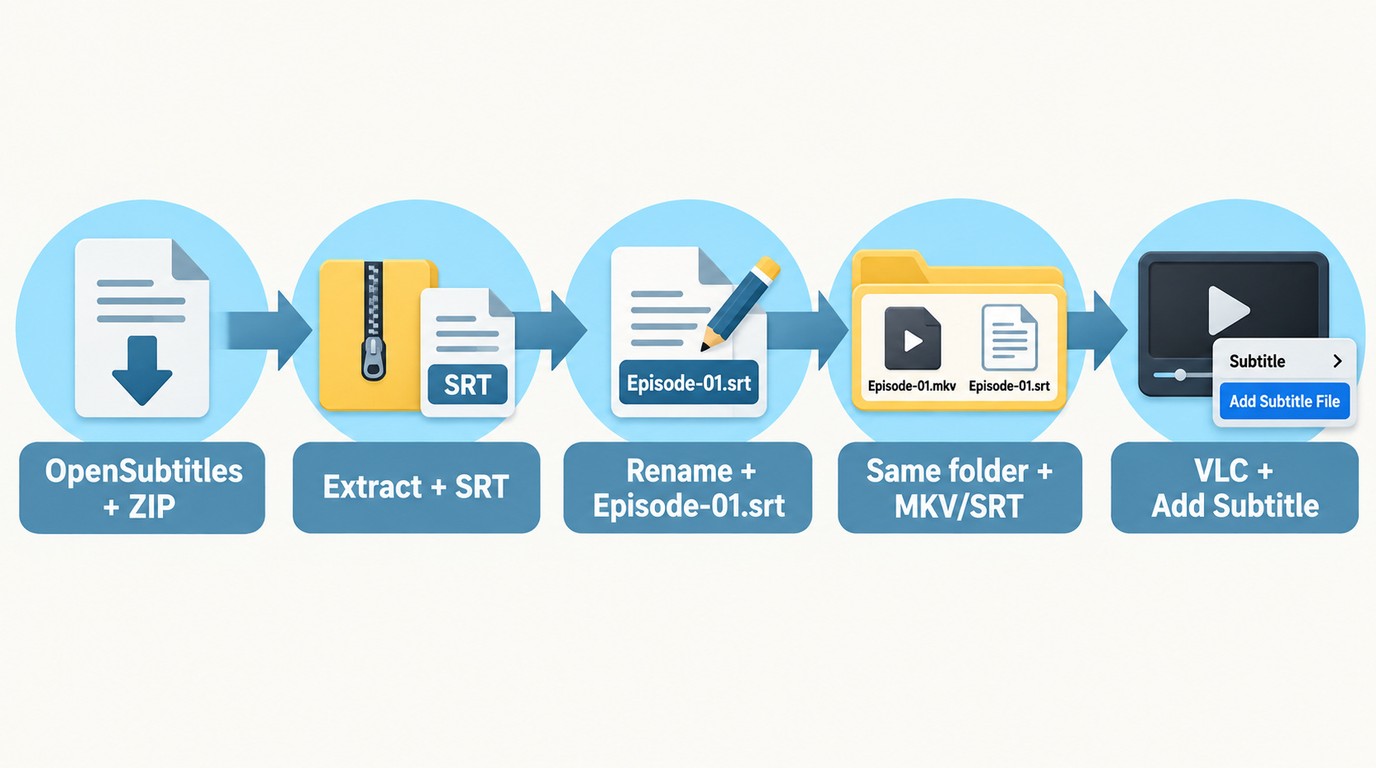
A correct subtitle file should match the title, season or episode, release name, and runtime before you load it. These steps turn a free subtitles download into a file your player can recognize.
- Choose a release database for a movie or episode, or an extractor for captions on an online-video page.
- Search the exact title, year, season, episode, language, and release name.
- Download the subtitle or ZIP archive, then check that it contains SRT, VTT, or another expected caption file.
- Unzip the archive and rename the subtitle to match the video filename.
- Put both files in the same folder, load the subtitle in your player, and check an early scene and a late scene.
Find the Exact Title and Release
Subtitle release matching starts with more than the movie name. Match the year for remakes, then match the season and episode for a series. A release name in the subtitle listing should line up with the video filename whenever possible.
If two files share the same title, compare runtime and the first spoken line. A different studio logo, recap, or opening sequence can shift every cue even when the language is correct.
Download and Unzip the File
A subtitle download should end as an SRT, VTT, or a ZIP archive containing one of those files. Do not open an executable installer from a subtitle page. Scan the archive, unzip it, and inspect the extension before loading it.
Rename the video and subtitle with the same base name, such as Episode-01.MKV and Episode-01.SRT. Place them in the same folder so many desktop and media-library players can associate them automatically.
Load Subtitles in Your Player
Open the video first, then select the player's command for adding a local subtitle file. In VLC, use Subtitle > Add Subtitle File and choose the extracted SRT or VTT file.
Check the first dialogue line, a scene near the middle, and a late scene. If the offset stays constant, adjust the subtitle delay. If the gap grows, replace the file with one matched to the video's release and frame rate.
Match Releases and Fix Subtitle Sync
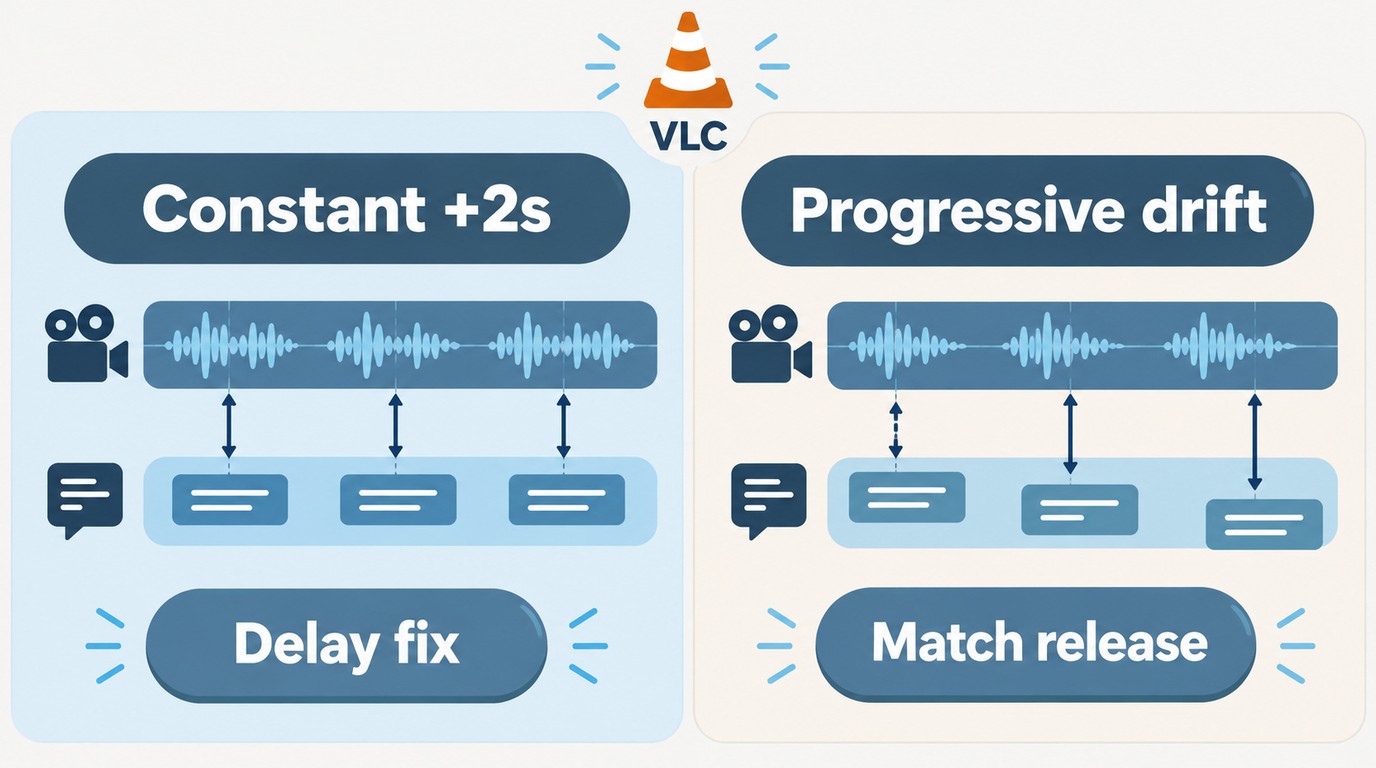
Subtitle release matching is the cleanest way to fix subtitle sync. A constant delay needs a timing adjustment; drift that grows from scene to scene usually points to a different cut or frame rate.
Match Release Name and Frame Rate
Start with the release name printed in the video filename and subtitle listing. Web, disc, broadcast, and extended cuts can start at different points or include different scenes. A file built for another cut will not stay aligned.
Frame-rate mismatch often appears as progressive drift: the subtitle looks correct near the start but moves farther ahead or behind later. Replacing it with a release-matched file is cleaner than applying larger delay changes throughout playback.
Fix Delay and Subtitle Drift
Use the player's subtitle synchronization control when every line is early or late by the same amount. Move the subtitle earlier or later, replay the scene, and stop when the first spoken word and caption appear together.
If timing changes again near the end, the problem is drift, not a single delay. Return to the database and select a file for the same release, runtime, and frame rate.
Choose SRT or VTT
SRT is the safer first choice for local playback because desktop players and media libraries widely recognize it. VTT is common for web captions and preserves cue data used by browser video.
Choose SRT for a movie or episode stored on your drive. Choose VTT when you are extracting captions from an online-video page or using a player that requests WebVTT.
Choose the Right Subtitle Source
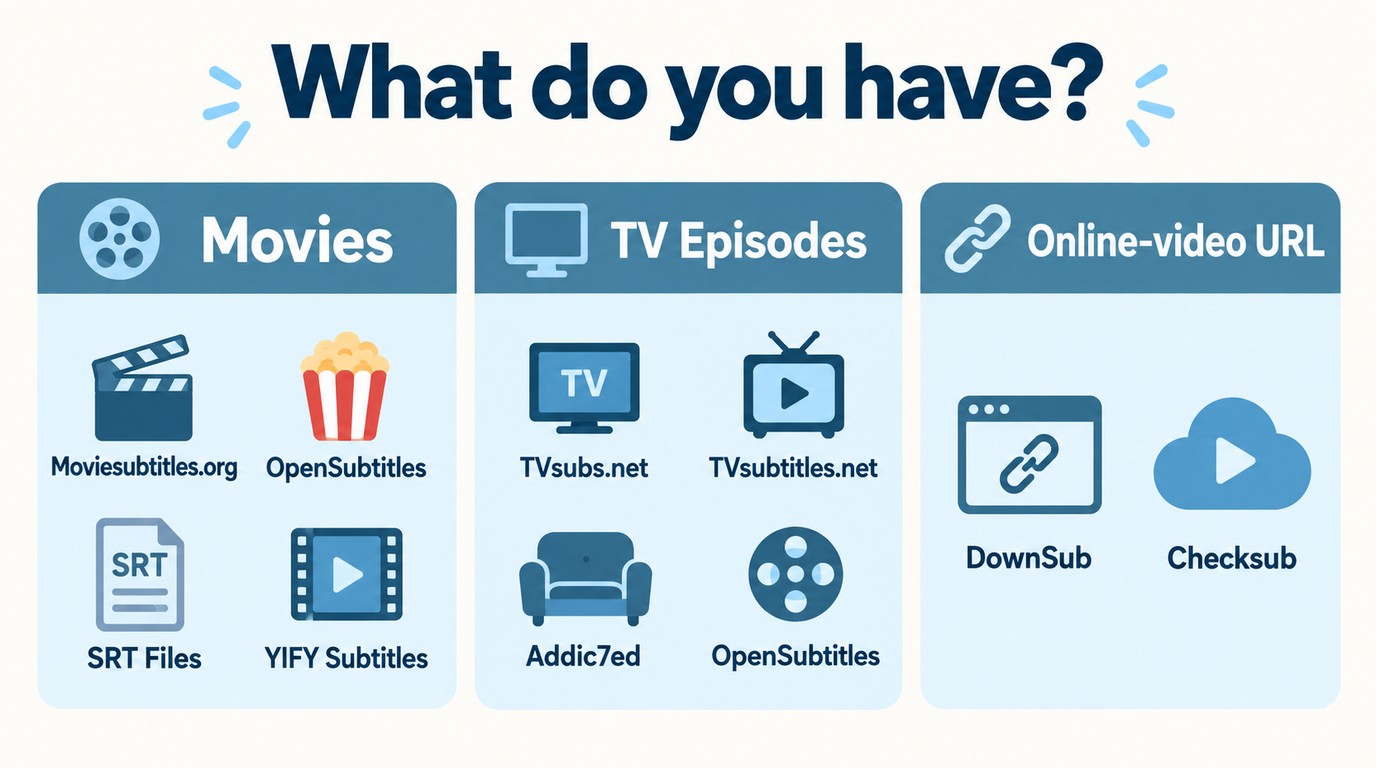
The best subtitles website is the one built for your source. Movie databases, episode repositories, and URL extractors answer different searches, so begin with the video you already have.
- For a downloaded movie, start with Moviesubtitles.org, OpenSubtitles, SRT Files, or the YIFY catalog with its redirect caution.
- For TV show subtitles, start with TVsubs.net, TVsubtitles.net, Addic7ed, or OpenSubtitles.
- For captions attached to an online-video page, paste the page address into DownSub or Checksub.
- For a bad timing match, search by release and frame rate before editing the subtitle file.
I would choose the source with the clearest release information, then test one early and one late scene before settling in to watch. If the captions drift, replacing the file usually takes less time than repairing a mismatched track line by line.
FAQs
Q
How can I tell whether a subtitle site is safe?
Use the service's official domain, avoid look-alike download buttons, and confirm that the file is a subtitle or ZIP archive rather than an executable installer. Scan compressed files before opening them.
A
Q
Can VLC find and download subtitles automatically?
VLC can load a local SRT through <strong>Subtitle > Add Subtitle File</strong>. A VLC subtitle download search is available through VLSub or compatible integrated subtitle-search support on desktop builds.
A
Q
What is a practical subtitle app for Android?
VLC for Android can load local subtitle files. When its search does not find the exact release, use a subtitle database in the browser, download the matching file, and open it with the video.
A
Q
Can I download only forced subtitles?
Look for tracks labeled <em>forced</em>, <em>signs</em>, or <em>foreign-parts-only</em>, then match the exact video release. A full-dialogue subtitle track will not isolate only the foreign-language scenes.
A
 Luna MillerOct 8, 2026
How to Block Someone on TikTok: App & Website Guide
 Luna MillerSep 17, 2026
How to Delete a TikTok Story in 5 Steps (2026)
 Luna MillerSep 16, 2026
How to Fix Cinavia Message Code 3: Start With the Source
![WinX DVD Author Review & Tutorial: Features, How to Use, and Limits [2026]](https://c.dvdnextcopy.com/uploads/images/17884278134315877-5212fbb54f6ef7f5e20bf1765fc74e79.jpg) Luna MillerSep 3, 2026
Luna MillerSep 3, 2026WinX DVD Author Review & Tutorial: Features, How to Use, and Limits [2026]
 Luna MillerAug 31, 2026
How to Rip a DVD with HandBrake in 2026: Steps, Settings & Limitations
 Luna MillerAug 28, 2026
Can Xbox One Play DVDs? How to Play DVD on Xbox One in 2026