 DVDneXtCOPY DVD Creator
Best DVD Burner for Mac in 2026: 6 Tools Reviewed

Summary: A Mac DVD burner may create either a Data DVD or a playable DVD-Video. Burn 3.1.9 is the free all-round pick, Finder covers file storage without extra software, and DVDFab DVD Creator adds menus, editing, and Disc/ISO/Folder output for video projects.
Table of Contents
DVD burning on a Mac splits into two tasks: storing files on a Data DVD or authoring videos into DVD-Video for compatible standalone players. The six tools below cover one or both of those jobs.
I compare current macOS and Apple Silicon support, DVD-Video authoring, menus and chapters, editing, output options, and trial limits. Current Macs also need an external writable optical drive before any physical disc can be burned.
Data DVD or Playable Video DVD: Choose the Right Mac Burner
The type of DVD you need should decide the software before anything else.
| DVD Type | What Goes on the Disc | Playback Result | Suitable Tools |
| Data DVD | MP4, MOV, photos, documents, and folders | Files remain ordinary computer files | Finder, Burn, Express Burn |
| DVD-Video | Videos are authored into a DVD structure | Plays in compatible standalone DVD players | Burn, DVDStyler, DVDFab, Cisdem, Express Burn |
| ISO / DVD Folder | A prepared disc structure | Useful as an archive/master or for burning later | DVDStyler, DVDFab, Cisdem, Express Burn |
Quick Comparison of the 6 Best DVD Burners for Mac
This comparison of 6 DVD burning software tools focuses on the features that change what you can create on a Mac. I have left out generic speed rankings and mixed-source ratings because they are not comparable without the same Mac, source files, settings, drive, and disc media.
| Comparison Item | Burn 3.1.9 | DVDStyler 3.2.1 | Finder | DVDFab DVD Creator 13.0.6.3 | Cisdem DVD Burner 8.3.0 | Express Burn 14.05 |
| Price / Trial | Free / open source; no trial limit | Free / open source; no trial limit | Included with macOS; no trial | 30-day trial; up to 3 DVDs without watermark, then paid | Fully functional trial; outputs first 5 minutes, or half of videos under 5 minutes | Fully featured trial; permanent free edition burns CDs only; DVD authoring requires Plus |
| macOS Support | macOS | macOS 10.15+ | Current macOS | macOS 12+ | macOS 10.15–26 | macOS 10.5+ |
| Apple Silicon | Yes | Not clearly documented | Native macOS | Yes | Native arm64 | Official Mac download listed as Intel |
| Data DVD | Yes | No | Yes | No | No | Yes |
| Playable DVD-Video | Yes | Yes | No | Yes | Yes | Yes |
| Menu Design | Limited | Flexible custom menus | No | Editable templates | Title + chapter menus | Template-based |
| Chapter Editing | Limited | Yes | No | Yes | Yes | Yes |
| Video Editing | Limited | No full editor | No | Trim, crop, filters, subtitles | Trim, crop, effects, subtitles | VideoPad required for editing |
| ISO / DVD Folder | Disc-image tools | ISO image | Burns supported disk images | Disc / ISO / Folder | Disc / ISO / Folder | Create / burn ISO |
| Current Maintenance | Burn 3.1.9 — Released February 2026 | DVDStyler 3.2.1 — Released November 2021 | Finder in macOS Tahoe 26 — Released September 2025 | DVDFab 13.0.6.3 for Mac — Released June 2026 | Cisdem 8.3.0 — Released August 2026 | Express Burn 14.05 for Mac — Released March 2025 |
| Best For | Free general DVD burning | Free custom DVD authoring | Data DVDs | Editing + DVD authoring | Current Mac menu/chapter authoring | Video + data + ISO projects |
1. Burn 3.1.9: Best Free DVD Burner for Mac for Data and Video DVDs
- OS: macOS; Apple Silicon support is included.
- Disc Types: Data discs, video/audio discs, and DVD-Video.
- DVD-Video: Yes.
- Price: Free and open source.
- Current Version: 3.1.9, released February 27, 2026.
- Compatibility Update: Version 3.1.8 fixed a macOS Tahoe issue.

Burn 3.1.9 is my first free DVD burner for Mac when I want one small application for both ordinary Data DVDs and playable DVD-Video. In Data mode, it writes files to disc; in Video mode, it can convert video when necessary and create DVD-Video instead of leaving the source as an MP4 or MOV file.
That two-purpose design is useful when the same external drive handles file archives and simple movie discs. Burn also remains actively maintained: Apple Silicon support arrived in version 3.0, a Tahoe problem was corrected in 3.1.8, and 3.1.9 followed in 2026.
I would not choose Burn when menu layout and detailed navigation are the main part of the project. Its DVD-Video workflow is much simpler than the authoring controls in DVDStyler, DVDFab, or Cisdem. For a straightforward free Mac DVD burner, that smaller scope is often enough.
2. DVDStyler 3.2.1: Free DVD Burning Software for Mac with Custom Menus
- OS: macOS 10.15+, Windows, and Linux.
- Input: AVI, MOV, MP4, MPEG, OGG, WMV, and other supported formats.
- Output: DVD-Video and ISO image.
- Menu Design: Flexible SVG-based menus with movable text, images, and buttons.
- Audio/Subtitles: Multiple tracks supported.
- Price: Free and open source.
- Stable Version: 3.2.1; 3.3b3 remains beta.
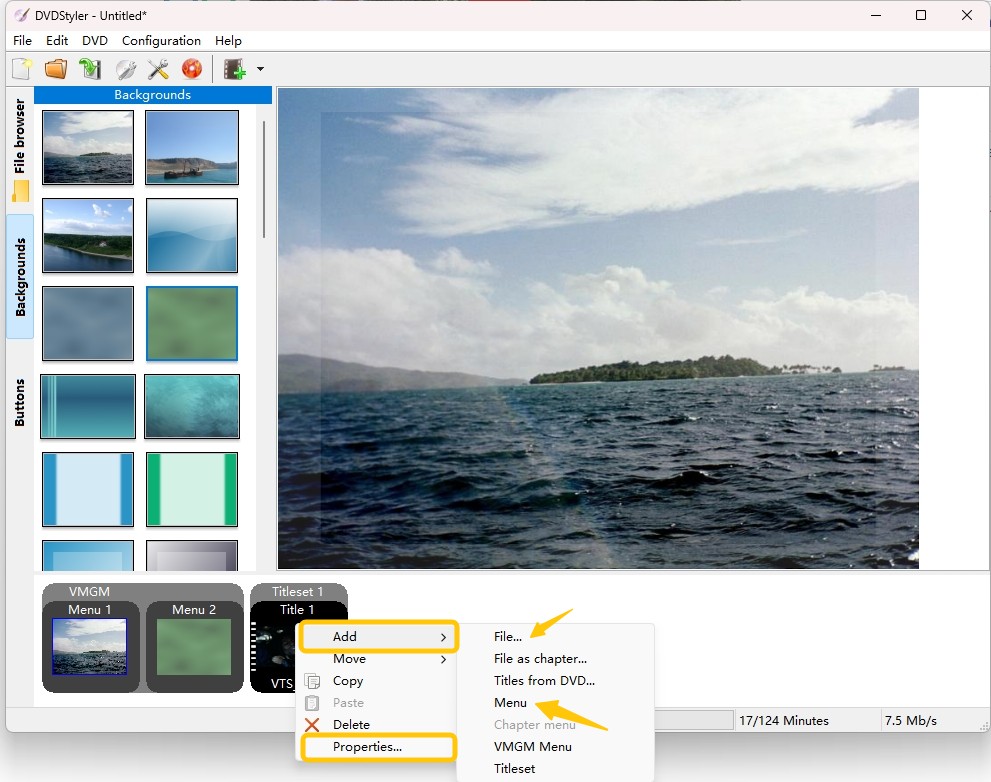
DVDStyler 3.2.1 is the better free DVD burning software for Mac when the finished disc needs more than a basic DVD-Video layout. I can place buttons, text, images, and other menu objects manually and control navigation with DVD scripting instead of fitting every project into a fixed menu template.
That control is useful for discs with several titles or chapters. Multiple audio and subtitle tracks are supported, and the program can generate an ISO image before the physical burn. It can also use MPEG and VOB sources without re-encoding when those files already meet the required conditions; ordinary MP4, MOV, and other sources still need DVD-compatible processing.
The main tradeoff is the amount of setup. Burn is quicker for a simple movie disc, while DVDStyler gives me more freedom when menu layout and navigation are part of the project.
3. Finder: Built-In Free Mac DVD Burner for Data Discs
- OS: macOS.
- Input: Files and folders.
- Output: Data CD/DVD; supported disk images can also be burned.
- DVD-Video Authoring: No.
- Menu / Chapters: No.
- Price: Included with macOS.
- Requirement: An external writable optical drive.

Finder is the simplest free Mac DVD burner when the goal is storage. Insert a blank disc, add files or folders, and burn them from Finder. Burn Folders are also useful when I need to write the same group of files to several discs without rebuilding the file set each time.
I use Finder for documents, photos, project files, or video files that only need to remain as files on the disc. It does not convert MP4 to DVD movie with a title menu and chapters. That makes Finder a good Data DVD tool, but not a replacement for Burn, DVDStyler, DVDFab, or Cisdem when the disc must play like a movie DVD.
4. DVDFab DVD Creator 13.0.6.3: Mac DVD Burner with Video Editing and Custom Menus
- OS: macOS 12 or newer; Intel Core i5 or Apple Silicon.
- Input: MP4, MKV, AVI, MOV, M2TS, FLV, VOB and 200+ video formats.
- Output: DVD-5/DVD-9 disc, ISO, or DVD folder.
- Menu Design: Editable backgrounds, thumbnails, text, fonts, colors, and playback buttons.
- Video Editing: Trim, crop, filters, watermark, subtitle editing, and image adjustments.
- Current Mac Version: DVDFab 13.0.6.3.

DVDFab DVD Creator 13.0.6.3 is a Mac DVD burner for projects whose source videos still need work before authoring. I can trim unwanted footage, crop a clip, adjust subtitles, or make basic image changes and then continue into the DVD menu without exporting a corrected copy from another editor first.
For DVD authoring, several videos can be placed on one disc, the menu background and title thumbnails can be changed, and the result can go directly to DVD or be saved as an ISO or folder. Those controls are more useful for a home-video or presentation disc than unrelated ripping or copy-protection features, which belong to different DVDFab modules and are not part of this DVD Creator review.
I would choose DVDFab when editing and authoring need to stay in the same workflow. If the source clips are already finished and the project only needs a simple movie disc, a free burner can cover the job with less software.
5. Cisdem DVD Burner 8.3.0: Mac DVD Burning Software with Chapter Menus and Native Apple Silicon
- OS: macOS 10.15 through macOS 26 Tahoe.
- Processor: Intel or Apple Silicon; 8.3.0 adds native arm64 support.
- Input: MP4, MKV, MOV, AVI, MTS/M2TS and many other formats.
- Output: DVD disc, ISO, or DVD folder.
- Menu Design: Separate title and chapter menus with editable backgrounds, music, text, thumbnails, and buttons.
- Video Editing: Trim, crop, subtitles, chapters, and other source adjustments.

Cisdem DVD Burner 8.3.0 is the most current Mac-specific commercial option here. The August 27, 2026 release added a native Apple Silicon arm64 build, while its current system requirements extend from Catalina 10.15 through Tahoe 26.
I would choose Cisdem when chapter navigation matters. A project can have separate title pages for different videos and chapter pages underneath longer titles, so a concert, lecture, or family event can open directly at useful scenes instead of forcing the viewer to scan through one long video.
Its menu editor also supports custom backgrounds, music, text, thumbnails, buttons, and page layouts, while the finished project can be written to a physical DVD, ISO, or DVD folder. The trial is more restrictive than the feature set: it only outputs the first five minutes of a video, or half of a source shorter than five minutes.
6. Express Burn 14.05 for Mac: DVD Burning Software for Video, Data, and ISO Projects
- OS: macOS 10.5 or later.
- Current Mac Version: 14.05.
- Disc Types: Video DVD and Data DVD; CD and Blu-ray capabilities depend on edition.
- Menu / Chapters: DVD menu templates and chapter management.
- ISO: Create and burn ISO images.
- Free Edition: Burns CDs only.
- DVD License: Requires Plus CD+DVD Authoring or higher.

Express Burn 14.05 covers more disc jobs than the dedicated DVD creators above. It can create Video DVDs with menus and chapters, write Data DVDs, and create or record ISO images from the same application.
For Video DVD authoring, the menu system provides templates, custom background imagery, title/subtitle text, and chapter management. I would use it for a straightforward authored DVD, but not for a project where menu layout needs the control available in DVDStyler or Cisdem.
The licensing is easy to misread. The permanent free Express Burn edition only writes CDs. DVD MPEG-2 authoring requires Express Burn Plus CD+DVD Authoring or the higher Blu-ray tier; the trial temporarily exposes the broader feature set for evaluation.
FAQs
Finder only shows File > New Burn Folder when a writable external optical drive is connected. Connect the drive first, then reopen the File menu.
Check that the external drive supports writing to the disc type you inserted, then confirm that the DVD has enough free capacity. macOS also uses temporary internal storage during the burn, so Apple recommends keeping about 4 GB free for a standard DVD and about 8 GB for a dual-layer DVD.
Apple recommends about 4 GB of free internal storage when burning a standard DVD and about 8 GB for a dual-layer DVD. This space is used temporarily during the burning process and is separate from the capacity of the blank disc.
Yes. Control-click the writable optical drive in the Finder sidebar and choose Erase Rewritable Disc. After the erase completes, the DVD-RW can be used for another burn.
You can use a 4K source in DVD authoring software that accepts it, but a standard DVD-Video is still standard definition. NTSC DVD-Video normally uses 720 × 480 and PAL uses 720 × 576, so the video is downscaled during authoring. If Finder writes the original 4K file to a Data DVD, it remains a computer file and is not converted into a standard movie DVD.
Conclusion
Burn 3.1.9 is my first free Mac DVD burner when one app needs to cover both Data DVDs and simple DVD-Video. For file storage and backups only, Finder is the cleaner choice because it is already built into macOS.
For a playable DVD with custom menus, source-video editing, subtitles, and Disc/ISO/Folder output, DVDFab DVD Creator 13.0.6.3 is the option I would use. The other tools remain useful for narrower authoring needs, but these three cover the clearest free, built-in, and full-authoring scenarios.
![Top 8 Best MP4 to DVD Converters on Windows & Mac [2026 Tested]](https://images.dvdnextcopy.com/2026/09/17/I2v69nzxIF6Xn7iue3ZRMGJ5-Ls0SF_z/feature_cover.jpg) Luna MillerSep 21, 2026
Luna MillerSep 21, 2026Top 8 Best MP4 to DVD Converters on Windows & Mac [2026 Tested]
 Luna MillerSep 21, 2026
DVD Region Codes Explained: Region 1 and Playback Options
![How to Remove DVD Copy Protection: Software and Free Methods [2026]](https://c.dvdnextcopy.com/media/How_to_Remove_DVD_Copy_Protection_d24c38a790.png) Steven VanceSep 21, 2026
Steven VanceSep 21, 2026How to Remove DVD Copy Protection: Software and Free Methods [2026]
 Luna MillerSep 21, 2026
How to Rip a Copy-Protected DVD on Win & Mac: 6 Ways
 Steven VanceSep 18, 2026
Top MP4 to ISO Converter in 2026: DVD Authoring vs Online Tools
 Steven VanceSep 18, 2026
How to Digitize DVD Collection: 5 Ways in 2026