 DVDneXtCOPY DVD Creator
6 Best DVD Authoring Software for Windows, Mac & Linux [2026 Review]

Summary: DVD authoring software turns ordinary videos into playable DVD-Video with menus, chapters, audio, subtitles, and navigation. DVDneXtCOPY DVD Creator is my primary choice for straightforward Windows authoring, TMPGEnc Authoring Works 7 is better for advanced playback control, and DVDStyler is my preferred free option for custom menu design.
Table of Contents
DVD authoring turns MP4, MKV, MOV, and other source videos into a structured DVD-Video project with titles, chapters, menus, and playback navigation. This is different from copying video files onto a data DVD: authoring prepares the content so it behaves like a movie DVD in a compatible standalone player.
When I choose DVD authoring software, I start with the DVD I actually want to hand to someone or play in a living-room player. A simple family-video disc needs clear menus and a short path from source video to DVD, ISO, or folder, while a more complex project may need chapter control, multiple audio or subtitle tracks, and specific playback behavior. The six programs below cover those different levels of authoring without treating ordinary disc burning as the same task.
![6 Best DVD Authoring Software for Windows, Mac & Linux [2026 Review]](https://c.dvdnextcopy.com/uploads/images/17878137374266684-946b5033598015112dd589485799bcde.jpg)
What DVD Authoring Software Actually Does
DVD authoring creates the DVD-Video structure; burning writes that finished structure to physical media. A program can burn an existing ISO without providing any authoring tools at all.
| Task | What Happens | DVD-Video Authoring? |
|---|---|---|
| Copy MP4, MKV, or MOV files to data DVD | The files remain ordinary computer video files. | No |
| Burn an existing DVD ISO | An already-authored DVD structure is written to disc. | No new authoring |
| Convert MKV, MOV, MP4 to DVD-Video | Creates titles, chapters, menus, navigation, and DVD-compatible video. | Yes |
A DVD authoring program normally handles DVD-compatible encoding during the project, so MP4 or MKV sources do not need to be converted manually first. Depending on the software, you can also select DVD-5 or DVD-9, NTSC or PAL, audio and subtitle tracks, chapter positions, and create DVD menu.
Quick Comparison of the 6 Best DVD Authoring Software
The comparison focuses on controls that change the authored DVD itself. Speed and subjective quality scores are excluded because a fair performance comparison would require identical source files, hardware, encoding settings, and disc media.
| Item | DVDneXtCOPY DVD Creator | TMPGEnc Authoring Works 7.1.3.16 | DVDFab DVD Creator 13.0.6.5 | Cisdem DVD Burner 8.2.0 | DVDStyler 3.2.1 | Express Burn 14.05 for Mac |
|---|---|---|---|---|---|---|
| OS | Windows 11/10/8.1/8/7 | Windows 10/11 64-bit | Windows 11/10/8.1/8/7; macOS 12+ | macOS 10.15-26 | Windows / macOS / Linux | Windows / macOS |
| Video Input | MP4, MKV, MOV, AVI + 200 formats | Broad video, audio, image, and subtitle support | MP4, MKV, AVI, MOV + 200 formats | 200+ video formats | AVI, MOV, MP4, MPEG, OGG, WMV, etc. | AVI, MPG, WMV, MOV, MP4, etc. |
| Creates DVD-Video | Yes | Yes | Yes | Yes | Yes | Yes |
| DVD-5 / DVD-9 | Yes | Yes | Yes | Yes | Yes | Yes |
| NTSC / PAL | Yes | Yes | Yes | Yes | Yes | Yes |
| Menu Design | Editable templates | Advanced templates + custom structure | Editable templates | Title/chapter menus + custom elements | Flexible SVG-based menus | Template-based menu creator |
| Audio / Subtitle | Track and subtitle selection | Multiple audio/subtitle streams | Multiple tracks + external subtitles | Subtitle support | Multiple audio/subtitle tracks | Stream support |
| Output | Disc / ISO / Folder | Disc / ISO / authored project | Disc / ISO / Folder | Disc / ISO / Folder | DVD-Video | Disc / ISO |
| Free / Trial | 30 days; 3 DVD creations | 30-day restricted trial | 30 days; 3 DVD creations | Partial-output trial | Free / Open Source | Trial; DVD authoring requires Plus |
| Best For | Direct Windows DVD authoring with menu | Advanced playback and menu control | Authoring with built-in editing and menu | Current Mac authoring | Free custom authoring | Simple authoring + general disc burning |
1. DVDneXtCOPY DVD Creator
- OS: Windows 11/10/8.1/8/7
- Input: MP4, MKV, MOV, AVI, and more than 200 video formats.
- Output: DVD disc, ISO image, or DVD folder.
- Menu Design: Editable templates with custom text, fonts, thumbnails, backgrounds, and navigation elements.
DVDneXtCOPY DVD Creator keeps the main DVD authoring decisions in one workflow. Multiple source videos can be organized into an authored DVD-Video project, placed behind a menu, and output directly to DVD or saved as an ISO or folder. For a family collection, training disc, or presentation, the menu editor lets me replace generic title labels and thumbnails with navigation that makes sense when the disc is opened on a television.
DVDneXtCOPY keeps the settings I use most for a normal DVD project on the same authoring screen: disc type, aspect ratio, audio, subtitles, menu design, preview, and output. I do not need to configure First Play actions or track-level playback rules before creating a simple multi-video DVD.
When I expect to produce several copies, I prefer authoring the project to an ISO first. The menu and DVD structure are prepared once, and the same finished image can be burned again without rebuilding the source project.
DVDneXtCOPY is a better fit for a straightforward Windows project, while TMPGEnc is better suited to discs that need detailed track, First Play, and playback-end control.

- Keeps menu, audio/subtitle, preview, and output controls in a direct authoring workflow.
- Creates a DVD disc, ISO, or DVD folder from the same project.
- Works well for multi-video DVDs where clear title organization matters.
- The trial allows three complete DVD creations rather than only a shortened output.
- Windows only.
- Does not provide the same depth of track and playback-behavior control as TMPGEnc.
- Trial is limited to three DVD creations.
2. TMPGEnc Authoring Works 7.1.3.16
- OS: Windows 10/11, 64-bit.
- Input: Video, audio, subtitle, image, and supported authored-disc sources.
- Output: DVD-Video, Blu-ray BDMV, AVCHD, ISO, and physical disc.
- Menu Design: Template-based or fully customized menu structures.
TMPGEnc Authoring Works 7.1.3.16 gives each DVD track detailed control over chapters, First Play content, menu actions, and what happens after playback ends.
That control is useful for training material, event programs, or episodic discs with several navigation levels. Menu templates provide a starting point, but buttons, chapter names, backgrounds, and page structure can all be customized when the DVD needs specific playback behavior.
Smart Rendering can keep compliant, unchanged portions of the source without re-encoding them, while edited or incompatible sections are processed as required. The benefit depends on the source format and project settings.
A basic two-title home DVD rarely needs First Play, track-end actions, several subtitle streams, or custom navigation logic, so TMPGEnc is best reserved for projects that use those controls.
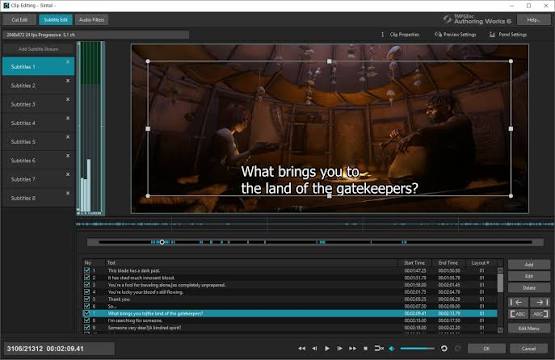
- Detailed track, chapter, subtitle, menu, and playback-flow control.
- Simulation lets the authored DVD behavior be checked before output.
- Smart Rendering can avoid unnecessary re-encoding for compliant unchanged material.
- Actively maintained, with version 7.1.3.16 released in 2026.
- Windows only.
- More setup than most home-video DVD projects require.
- The 30-day trial adds a logo-video track and does not accept H.265/HEVC input.
3. DVDFab DVD Creator 13.0.6.5
- OS: Windows 11/10/8.1/8/7 64-bit; macOS 12 or newer.
- Input: MP4, MKV, AVI, M2TS, TS, MOV, WMV, FLV, M4V, VOB, and other common video formats.
- Output: DVD-5/DVD-9 disc, ISO, or DVD folder.
- Menu Design: Editable backgrounds, thumbnails, text, fonts, colors, and playback buttons.
DVDFab DVD Creator 13.0.6.5 combines DVD authoring with source-video editing. If a clip still needs trimming, cropping, subtitle work, or a basic image adjustment, I can make those changes before building the DVD menu instead of exporting a corrected video from another application first.
For DVD authoring itself, multiple videos can be arranged for playback, audio and subtitle tracks can be selected, and the menu can be customized with different backgrounds, title thumbnails, text, and navigation buttons. The finished project can go to a physical DVD, ISO, or DVD folder.
I use the built-in editor when source footage still needs trimming, cropping, or subtitle changes before authoring; otherwise I move directly to the DVD settings and menu.
DVDFab also runs on Windows and macOS, with current Mac support for macOS 12 or newer and Apple Silicon.
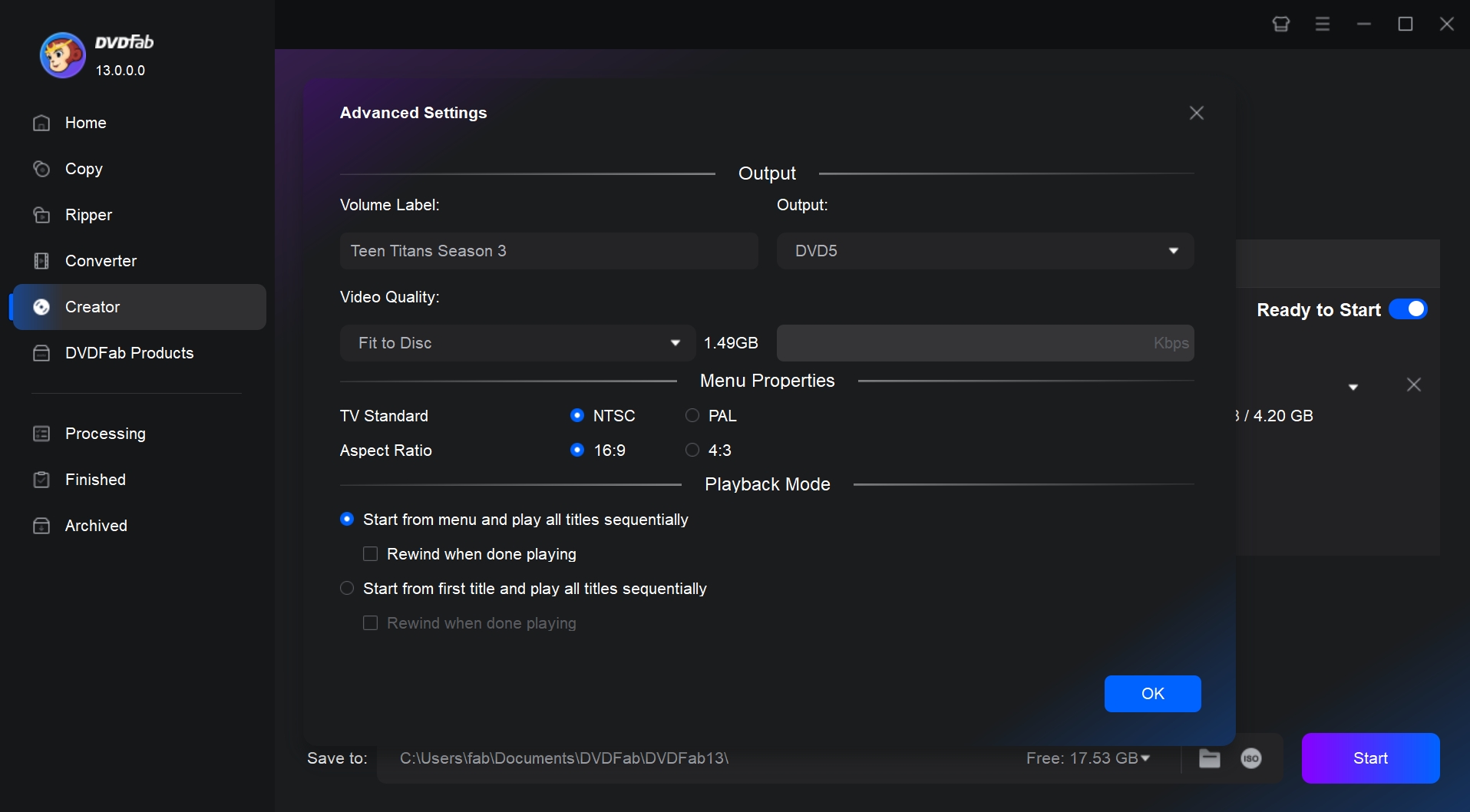
- Video editing and DVD authoring are available in the same Creator workflow.
- Runs on both Windows and macOS.
- Custom menu plus Disc/ISO/Folder output.
- Supports external subtitles and multiple source formats.
- Users who need advanced track-level playback control will get more depth from TMPGEnc.
- Paid after the trial period.
4. Cisdem DVD Burner 8.2.0
- OS: macOS 10.15 through macOS Tahoe 26; Intel and Apple Silicon.
- Input: MP4, MKV, MOV, AVI, M2TS, MTS, TS, WMV, and 200+ formats.
- Output: DVD disc, ISO, and DVD folder.
- Menu Design: Separate title/chapter menus with custom backgrounds, music, text, thumbnails, buttons, and layouts.
Cisdem DVD Burner 8.2.0 provides current Mac DVD authoring with separate title and chapter menus. Several videos can sit on the top-level menu while a longer recording gets its own scene navigation underneath, which is useful for concerts, lectures, travel recordings, or family events.
The menu editor goes beyond switching themes. Background images or music, thumbnails, text, buttons, and page layouts can be changed around the navigation structure. Playback behavior can also be adjusted so a selected title can return to the menu instead of automatically continuing to the next item.
Separate chapter pages let viewers jump directly to useful scenes instead of scrubbing through one long title.
Version 8.2.0 supports Apple Silicon and current macOS releases. The trial only creates the first five minutes of a source, or half of a video shorter than five minutes.

- Separate title and chapter-menu authoring.
- Current Apple Silicon and macOS support.
- Custom menu backgrounds, music, buttons, thumbnails, and layouts.
- Disc, ISO, and DVD folder output.
- Primarily a Mac-focused choice.
- Trial produces only partial video output.
- Detailed menu controls may be unnecessary for a very simple one-title DVD.
5. DVDStyler 3.2.1
- OS: Windows, macOS 10.15+, and Linux.
- Input: AVI, MOV, MP4, MPEG, OGG, WMV, and other supported formats.
- Output: DVD-Video projects and physical DVDs.
- Menu Design: SVG-based menus with freely positioned text, images, and buttons.
DVDStyler 3.2.1 is the free DVD authoring software I would choose when menu and navigation control matter more than having a polished consumer-style workflow. Its menu objects can be placed and resized manually, imported images can be used as backgrounds, and buttons can be connected through customizable DVD navigation.
DVDStyler lets you place titles, images, and navigation buttons manually instead of fitting the project into a fixed template.
DVDStyler can also use compliant MPEG/VOB sources without re-encoding under supported conditions. That is useful when the material has already been prepared for DVD. Ordinary MP4, MKV, or high-resolution sources still require conversion to DVD-compatible video during authoring.
I can build a basic menu more quickly with DVDneXtCOPY, while DVDStyler gives me more control when I am willing to position menu objects and navigation manually.

- Completely free and open source.
- Windows, macOS, and Linux support.
- Flexible menu-object placement and DVD scripting.
- Supports multiple audio and subtitle tracks.
- Requires more manual menu and navigation setup.
- Stable release remains 3.2.1; newer 3.3 builds are still beta.
- Limited integrated video editing compared with DVDFab or Cisdem.
6. Express Burn 14.05
- OS: Windows and macOS; 14.05 is the current listed Mac release.
- Input: AVI, MPG, MPEG, ASF, WMV, MOV, MP4, and other supported video formats.
- Output: Video DVD, ISO, and other optical-disc projects.
- Menu Design: Templates, title/subtitle text, and custom background images.
Express Burn provides DVD authoring inside a broader disc-burning application. Videos can be arranged into titles, chapter points can be added, and a menu can be created before the project is encoded as DVD-Video. PAL/NTSC and video settings are available for the authored disc.
The menu tools are simpler than those in TMPGEnc, DVDStyler, or Cisdem. Templates, title text, subtitles, and a custom background cover the essentials, but I would not use Express Burn for a project where menu design is a major part of the presentation.
Express Burn also handles data discs and ISO projects, so one application can cover occasional DVD authoring and general optical-disc burning.
The permanent free edition burns CDs only. DVD MPEG-2 authoring requires an Express Burn Plus license that includes DVD authoring.

- Combines DVD authoring with broader optical-disc and ISO functions.
- Supports titles and manual chapter management.
- Suitable for relatively simple DVD-Video projects.
- DVD authoring requires a paid Plus edition.
- Menu customization is more limited than dedicated authoring programs.
- No comparable built-in source-video editor.
FAQs
No. ImgBurn writes prepared images and disc structures, but it does not perform the DVD-Video authoring that turns ordinary MP4, MKV, or MOV files into titles, chapters, menus, and DVD navigation. If you already have a finished DVD ISO, ImgBurn can still handle the physical writing stage.
DVDStyler 3.2.1 is my main free recommendation. It is open source and supports Windows, macOS, and Linux, with interactive menus, customizable navigation, multiple audio tracks, and subtitles. Its workflow is more manual than DVDneXtCOPY or DVDFab, but it gives you considerably more freedom over menu layout without a paid license.
No current Windows 11 application provides a built-in equivalent of the old Windows DVD Maker for burning DVD-Video with menus and navigation. Windows can write ordinary files to optical media, but file burning does not author them into a movie DVD.
Yes. Many authoring programs can finish the DVD structure without writing a physical disc. DVDneXtCOPY, DVDFab, and Cisdem can save authored projects as ISO images or DVD folders, while TMPGEnc can create ISO output from authored DVD-Video data.
Usually not. DVD authoring software accepts common source formats and handles conversion to DVD-compatible video while building the project. Manual pre-conversion is mainly useful for a specialized encoding workflow or when the source is already compliant MPEG/VOB material that can be reused with less processing.
Conclusion
For most Windows users, DVDneXtCOPY DVD Creator is my pick for the best DVD authoring software in this comparison. It turns MP4, MKV, MOV, AVI, and other videos into playable DVD-Video while keeping menu editing, audio/subtitle selection, preview, and Disc/ISO/Folder output in one project.
I recommend it most for home videos, presentation discs, and multi-title DVDs where clear navigation matters more than advanced track-level playback rules. When I need several physical copies, I author the project once as an ISO and burn that finished image as needed.
![Top 8 Best MP4 to DVD Converters on Windows & Mac [2026 Tested]](https://images.dvdnextcopy.com/2026/09/17/I2v69nzxIF6Xn7iue3ZRMGJ5-Ls0SF_z/feature_cover.jpg) Luna MillerSep 21, 2026
Luna MillerSep 21, 2026Top 8 Best MP4 to DVD Converters on Windows & Mac [2026 Tested]
 Luna MillerSep 21, 2026
DVD Region Codes Explained: Region 1 and Playback Options
![How to Remove DVD Copy Protection: Software and Free Methods [2026]](https://c.dvdnextcopy.com/media/How_to_Remove_DVD_Copy_Protection_d24c38a790.png) Steven VanceSep 21, 2026
Steven VanceSep 21, 2026How to Remove DVD Copy Protection: Software and Free Methods [2026]
 Luna MillerSep 21, 2026
How to Rip a Copy-Protected DVD on Win & Mac: 6 Ways
 Steven VanceSep 18, 2026
Top MP4 to ISO Converter in 2026: DVD Authoring vs Online Tools
 Steven VanceSep 18, 2026
How to Digitize DVD Collection: 5 Ways in 2026