 DVDneXtCOPY DVD Ripper
Standard DVD Case Dimensions: 7.48 × 5.31 Inches + Cover Size

Summary: You cannot find your favorite DVD in the pile of countless DVD collections, or your DVDs are getting scratched and damaged due to dust and casual handling. So, the best way to organize DVDs while preventing damage is to keep them in a DVD case by knowing the details about DVD case dimensions. So, here, in this article, you will get all the important information, including DVD case size, shape, varieties, etc.
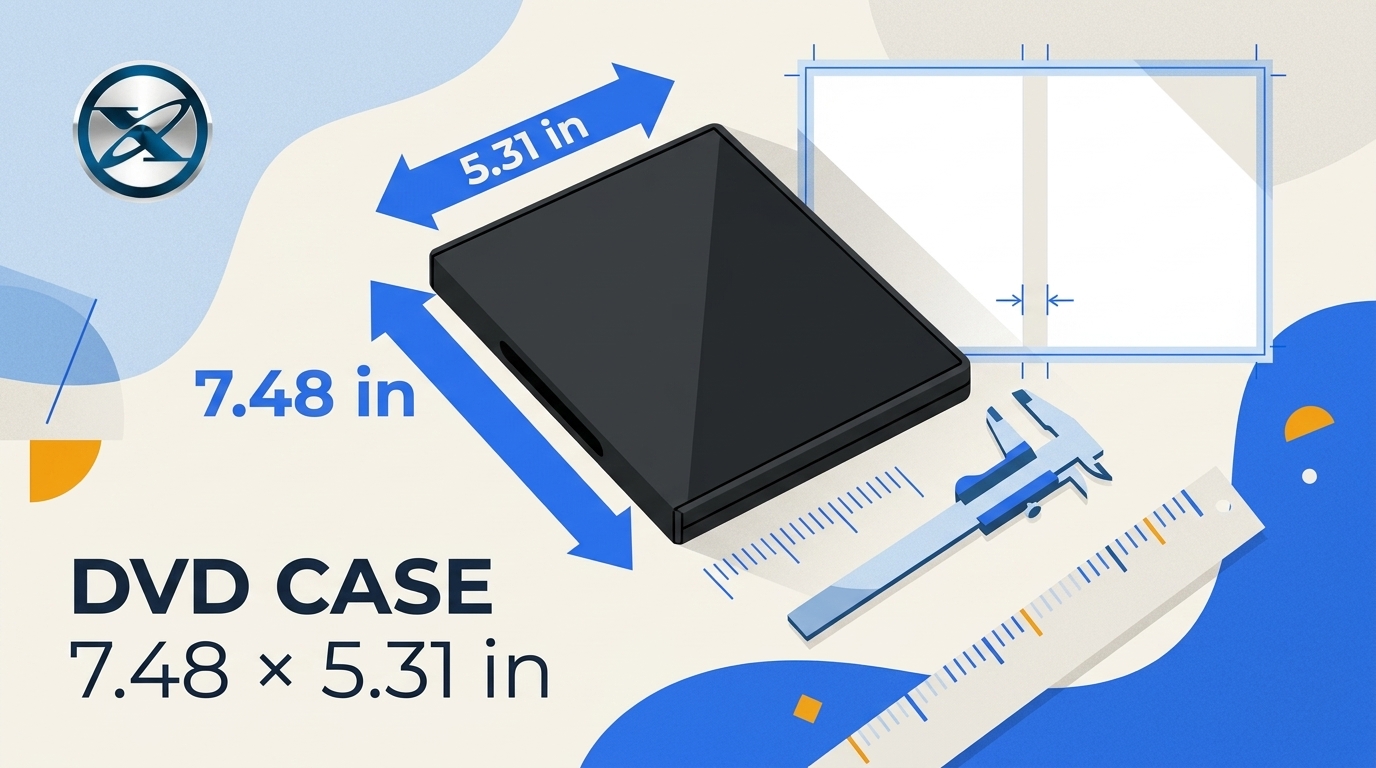
Table of Contents
When I sort a DVD collection or prepare replacement artwork, DVD case dimensions are the first numbers I check. A standard DVD case measures 7.48 × 5.31 inches, but the paper insert and spine need separate measurements. This page compares case sizes, cover layouts, and print setup.
Standard DVD Case Dimensions
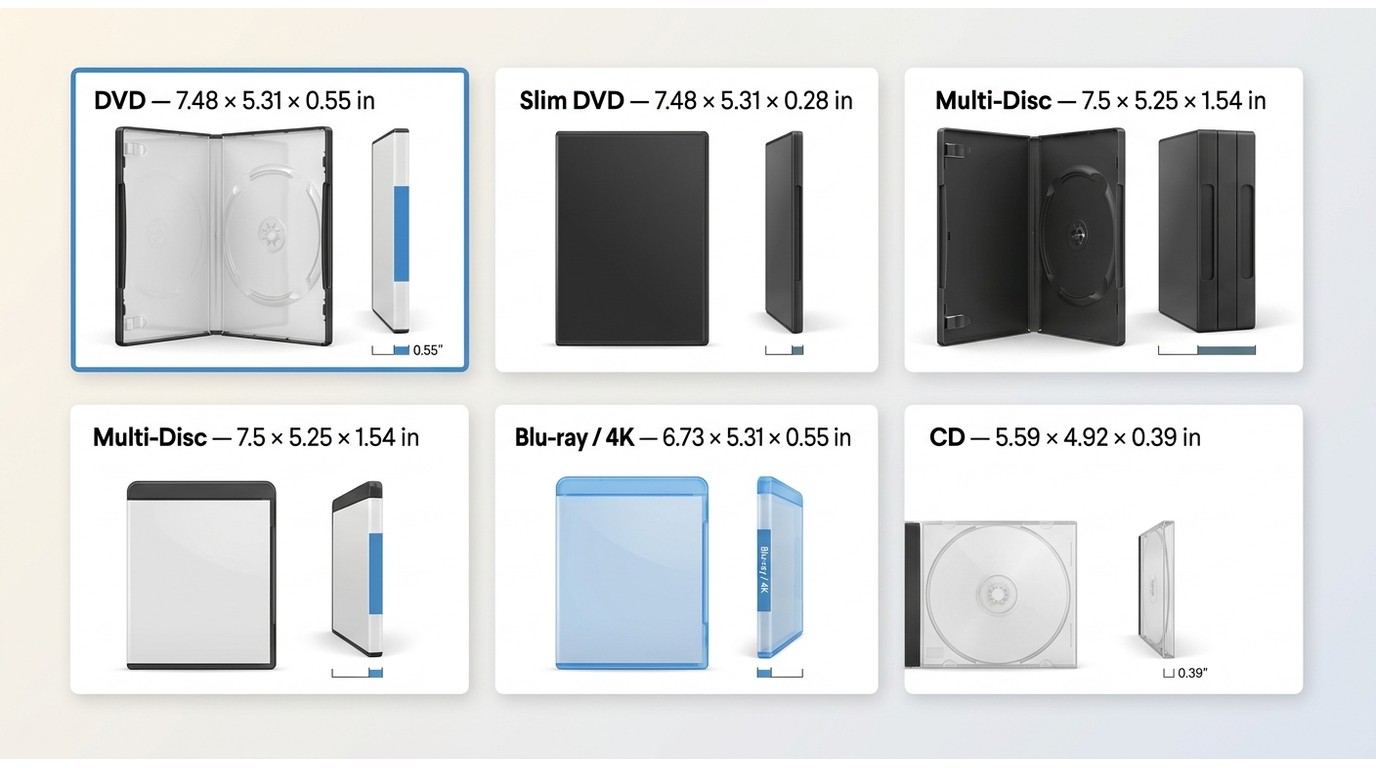
A DVD case is a simple, thin plastic box, mostly available in black Or transparent color, to keep a DVD disc. With the gradual evolution of DVDs, such as single-side, double-side, single-layered, double-layered, etc, the DVD case dimensions and size also evolve and change.
DVD case dimensions describe the outside plastic shell. The standard keep case is 7.48 × 5.31 × 0.55 inches (190 × 135 × 14 mm); slim and multi-disc cases keep a similar face size but change the spine depth.
| Case or format | Height | Width | Spine or thickness | Typical use |
|---|---|---|---|---|
| Standard DVD keep case | 7.48 in / 190 mm | 5.31 in / 135 mm | 0.55 in / 14 mm | Single-disc retail packaging |
| Slim DVD case | 7.48 in / 190 mm | 5.31 in / 135 mm | 0.28 in / 7 mm | Space-saving single disc |
| Multi-disc DVD case | 7.5 in / 190.5 mm | 5.25 in / 133.4 mm | 1.54 in / 39.1 mm | Box sets and collections |
| Blu-ray case | 6.73 in / 171 mm | 5.31 in / 135 mm | 0.55 in / 14 mm | Standard Blu-ray packaging |
| 4K UHD case | 6.73 in / 171 mm | 5.31 in / 135 mm | 0.55 in / 14 mm | Physical packaging comparison |
| CD jewel case | 5.59 in / 142 mm | 4.92 in / 125 mm | 0.39 in / 10 mm | Standard audio CD storage |
These are typical packaging measurements, not disc-processing specifications. Replacement shells vary, especially multi-disc cases, so measure the closed case before preparing artwork.
Standard Keep Case
For conventional packaging, the 14 mm standard keep case is the dependable starting point. Its height and width are common enough for many templates, but the insert still needs a full-wrap layout rather than a single-panel image.
Slim and Multi-Disc Cases
Slim cases save shelf space, while multi-disc cases work well for sets. I would choose the physical shell first, because a wider multi-disc spine changes the cover insert even when the front panel appears familiar.
DVD Cover Insert Size and Print Specs
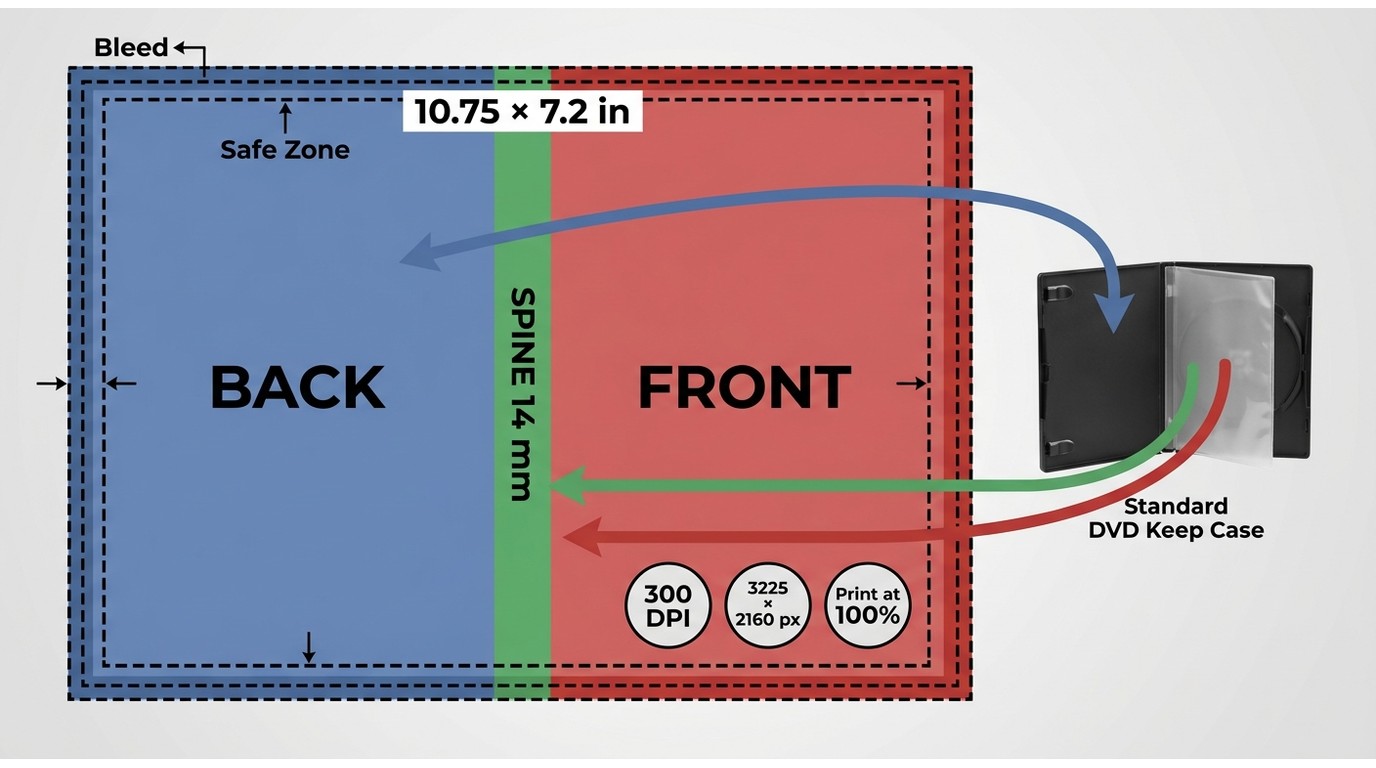
A DVD cover is the flat paper insert that slides beneath the clear outer sleeve. It is not the same measurement as the case shell, and it is not an A4 sheet.
Full-Wrap Insert Layout
A standard full-wrap DVD cover insert is about 273 × 183 mm (10.75 × 7.2 inches). It includes a front panel, a back panel, and a spine. On a standard 14 mm case, the two panels are about 129.5 mm wide before the spine is added. Measure the actual shell before final export because replacement cases can differ.
Pixels, DPI, and Bleed
DVD case dimensions in pixels depend on the document resolution. At 300 DPI, a 10.75 × 7.2-inch full-wrap design is about 3225 × 2160 pixels before bleed. Add bleed and safe zones according to the printer or template, then print at Actual Size or 100% with scaling turned off. When a cover prints too small, the problem is usually a mismatch between the physical layout and printer scaling, not the pixel count alone.
DVD and Blu-ray Case Sizes
Blu-ray and 4K UHD cases are shorter than standard DVD keep cases, as the packaging table shows. Do not reuse a Blu-ray cover template for a DVD case without resizing the height, panels, and spine.
DVD Disc Size and Capacity
A standard DVD disc is 120 mm (4.7 inches) in diameter. Its case dimensions do not determine how much data it holds; DVD capacity depends on the disc format, including its sides and data layers.
Preserving Physical DVDs and Artwork
Keep discs upright in clean cases, away from direct sunlight, heat, and heavy pressure. Store the artwork with its matching disc, and use a soft sleeve or hub that does not scrape the data surface. These simple steps protect the collection without changing the original packaging.
For discs you own or are authorized to access, a digital copy can also make a collection easier to search. Readers who want that separate project can digitize a DVD collection while keeping the original disc and its case together.
DVDneXtCOPY DVD Ripper is a Windows tool for creating local files from protected DVD discs, ISO files, or DVD folders. It offers multiple output formats, a Passthrough option for retaining original streams without re-encoding, and subtitle selection. It is relevant when you want searchable local copies, not when you only need replacement artwork or case measurements.
- Decryption: Using Cloud Decryption Service APS, CSS, etc, you can remove high-end encryption or regional code with a few clicks.
- Lossless 1:1 Ripping: You can rip a DVD with 1:1 quality without losing any original data and details. With high-quality video, you can enjoy audio in 5.1 AC3 quality.
- Save the files with 1000 format support: To play your ripped DVD on portable devices, you can compress the file size and rip them to any of your preferred formats.
- Rip DVD with 260+ device preset: DVDneXtCOPY lets you rip DVD to any new blank DVD or ISO Image file or folder. It also lets you select any desired device preset from 260+ options.
- High-quality ripping with the advanced setting: It supports high-end profile filters such as 3D, 4K, 8K, passthrough, etc, to ensure Ultra HD quality streaming of any poor quality video. With the "Advanced Settings" option you can adjust, resolution, codec, quality, subtitles etc.
- Optimize Video Editing: Using a Built-in video editor, you can give a new appeal to your video while ripping with cropping, trimming, adding watermarks, subtitles, etc.

FAQs
Why does my DVD cover print smaller than the case?
The file may be correct, but the printer can shrink it through Fit to Page or other scaling settings. Check that the document uses the intended physical dimensions and print at Actual Size or 100%. A plain-paper test lets you compare the panel edges and spine before using final stock.
ACan I use a Blu-ray cover template for a DVD case?
Not without resizing it. Blu-ray cases are shorter than standard DVD cases, so a Blu-ray template will leave visible gaps or crop artwork in a DVD shell. Start with the case you have, then set the document height, panels, and spine for that shell.
ADo multi-disc DVD cases need wider cover inserts?
Usually, the front and back panels stay close to the standard size, but the spine becomes wider. Measure the closed multi-disc case and adjust the center spine area before printing. Do not stretch the front artwork to create extra spine width.
AShould I measure a replacement case before printing artwork?
Yes. Replacement shells can vary in spine width and sleeve opening. Measure the height, width, and spine with the case closed, then make a paper proof. If the proof sits flat beneath the sleeve without folding at the spine, the layout is ready to print.
AConclusion
A standard DVD keep case is 7.48 × 5.31 × 0.55 inches, while slim and multi-disc cases mainly change the spine depth. Keep the plastic shell, flat paper insert, and disc measurements separate. My recommendation is to choose the physical case first, confirm its spine width, and build or adjust the full-wrap artwork around that exact shell before printing.
![Top 8 Best MP4 to DVD Converters on Windows & Mac [2026 Tested]](https://images.dvdnextcopy.com/2026/09/17/I2v69nzxIF6Xn7iue3ZRMGJ5-Ls0SF_z/feature_cover.jpg) Luna MillerSep 21, 2026
Luna MillerSep 21, 2026Top 8 Best MP4 to DVD Converters on Windows & Mac [2026 Tested]
 Luna MillerSep 21, 2026
DVD Region Codes Explained: Region 1 and Playback Options
![How to Remove DVD Copy Protection: Software and Free Methods [2026]](https://c.dvdnextcopy.com/media/How_to_Remove_DVD_Copy_Protection_d24c38a790.png) Steven VanceSep 21, 2026
Steven VanceSep 21, 2026How to Remove DVD Copy Protection: Software and Free Methods [2026]
 Luna MillerSep 21, 2026
How to Rip a Copy-Protected DVD on Win & Mac: 6 Ways
 Steven VanceSep 18, 2026
Top MP4 to ISO Converter in 2026: DVD Authoring vs Online Tools
 Steven VanceSep 18, 2026
How to Digitize DVD Collection: 5 Ways in 2026