 DVDneXtCOPY DVD Ripper
NTSC vs PAL DVD: Resolution, Frame Rate & Compatibility

Summary: NTSC-based DVDs commonly use 720×480 video at about 29.97 fps, while PAL-based DVDs commonly use 720×576 at 25 fps. Neither is universally better: first check whether your player supports the disc's video standard and DVD region code, and convert PAL to NTSC or NTSC to PAL only when the target device or authoring requirement actually needs it.
Table of Contents
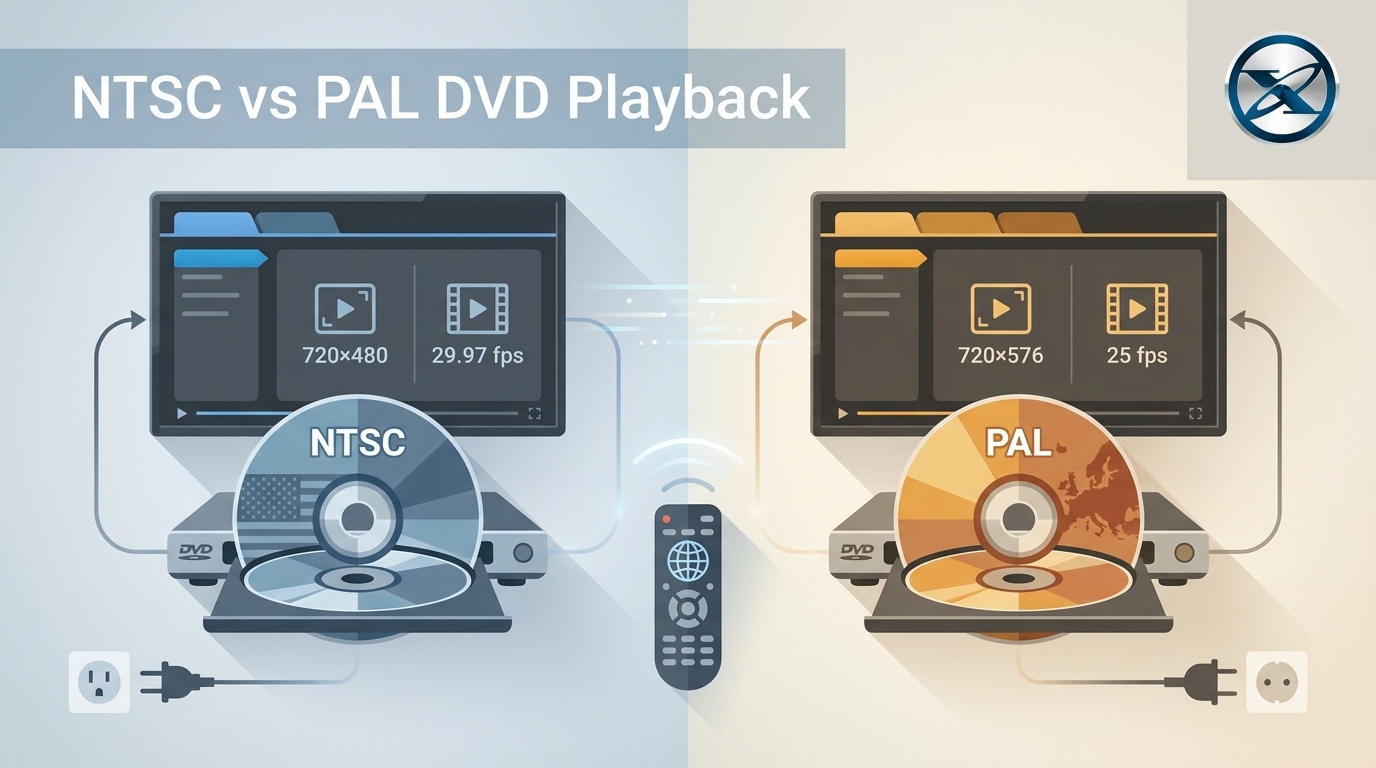
A PAL or NTSC label on a DVD affects the video dimensions and timing the disc was authored to use. Older players may support only one system, while other equipment accepts both. A separate DVD region code can also stop playback, so a disc that refuses to play does not automatically need PAL-to-NTSC conversion.
For standard DVD-Video, the common comparison is straightforward: NTSC-based DVDs commonly use a full-size 720×480 frame at about 29.97 fps, while PAL-based DVDs commonly use 720×576 at 25 fps. Neither format is universally better. If the intended player already supports the disc, preserving its original standard usually avoids an unnecessary resolution and timing conversion.
NTSC vs PAL DVD: Quick Comparison
| DVD Characteristic | NTSC-Based DVD | PAL-Based DVD |
|---|---|---|
| Common full-size frame | 720×480 | 720×576 |
| Common DVD frame rate | About 29.97 fps | 25 fps |
| Television family | 525/60 | 625/50 |
| Common historical use | North America, Japan, and some other regions | Europe, Australia, and many other regions |
| DVD display aspect ratio | 4:3 or 16:9 | 4:3 or 16:9 |
| Universally better? | No | No |
PAL has more vertical samples in the common full-size DVD frame, while NTSC uses a higher common frame rate. Those differences do not make one format universally better. The source transfer, compression, playback device, display, and any standards conversion also affect the finished picture.
What Are NTSC and PAL DVDs?
NTSC and PAL began as families of conventional television systems rather than as DVD technologies. DVD-Video later used digital video dimensions and timing associated with these television families, which is why discs are still commonly described as NTSC or PAL.
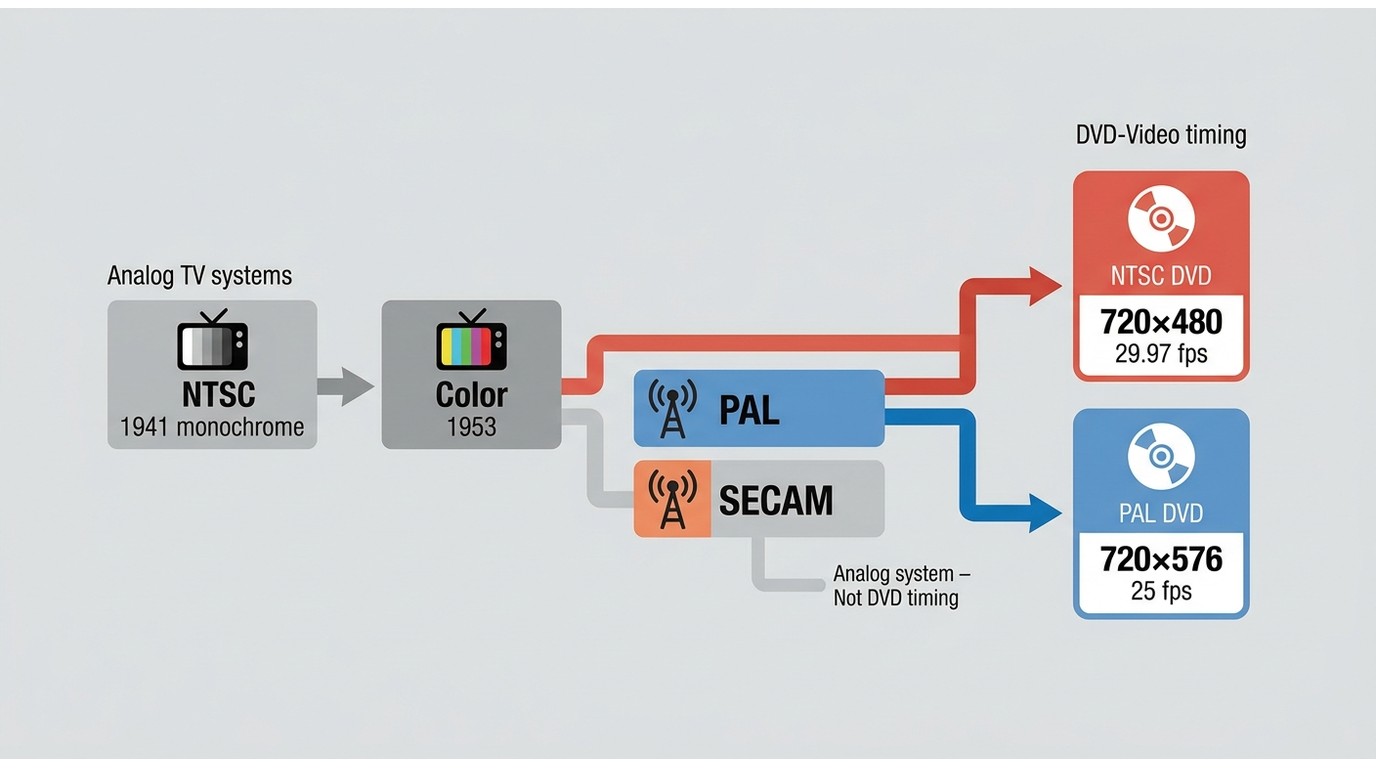
What Is an NTSC DVD?
An NTSC-based DVD is authored for the 525/60 television family. A common full-size DVD frame is 720×480. Its familiar video rate is approximately 29.97 fps; more precisely, digital 525 video uses 30000/1001 frames per second. DVD-Video can also use 4:3 or 16:9 display aspect ratios.
NTSC was historically associated with the United States, Japan, and several other territories, but location alone does not determine whether a disc will play. The actual DVD player and display must support the video signal the disc produces.
What Is a PAL DVD?
A PAL-based DVD is authored for the 625/50 television family. Its common full-size frame is 720×576, and the standard video rate used in this comparison is 25 fps. PAL DVD-Video can also use either 4:3 or 16:9 display.
PAL was historically widespread in Europe, Australia, and many other territories. The name Phase Alternating Line comes from the way part of the chrominance signal was handled in the analogue PAL television system. It does not mean that some picture lines are PAL while other lines are NTSC.
NTSC vs PAL: The Differences That Matter for DVD Playback
The analogue standards contain many historical technical differences, but DVD playback usually comes down to picture dimensions, timing, and whether the equipment supports the disc.
Resolution and Picture Size
A common full-size NTSC DVD frame is 720×480, while PAL commonly uses 720×576. DVD-Video can also use smaller compliant frame sizes, so 720×480 and 720×576 are the common full-size comparison rather than the only possible DVD dimensions.
PAL's larger vertical dimension does not guarantee a better picture. A poorly mastered 720×576 DVD can still look worse than a carefully transferred 720×480 disc. The source, MPEG compression, bitrate, scaling, and display all affect perceived quality.
Both standards can carry 4:3 and 16:9 DVD video. For a deeper explanation of frame size, aspect ratio, and why a 720×480 DVD is not the same thing as 720p, see our DVD resolution guide.
Frame Rate and Motion
PAL-based DVD video commonly uses 25 fps. NTSC-based digital 525 video uses 30000/1001 fps, commonly described as about 29.97 fps.
This difference matters most when one system is converted to the other. Moving between 25 and approximately 29.97 fps may require frame creation, removal, cadence adjustment, or other timing treatment. Simply changing a frame-rate value without handling the video correctly can produce repeated-frame judder or uneven motion.
Interlaced video introduces another variable. Frame rate, field rate, film cadence, and progressive versus interlaced scanning should be checked separately rather than treated as one number.
Color System and Modern Digital Video
The classic PAL and NTSC standards used different methods for analogue color transmission. Those historical color-system differences explain part of their names and development, but they should not be used to declare every PAL DVD better than every NTSC DVD.
For digital DVD playback, resolution, frame timing, the quality of the original transfer, and the behavior of the player and display are usually more useful factors to examine.
Will a PAL or NTSC DVD Play on My Device?
A PAL DVD does not automatically need conversion just because it is being played in an NTSC-associated country, and the reverse is also true. Some equipment supports both systems while other players are more restrictive.
Before converting a disc, check the DVD player's supported video standards and the DVD region code separately. A disc can use a video system the player understands and still fail because its region code is incompatible.
Check the Player's PAL/NTSC Support
Look at the player's manual or specification page for PAL, NTSC, multi-system playback, 50 Hz, or 60 Hz support. Do not assume that every recent player or television accepts both standards.
If the player reads the disc and the picture displays correctly, there is usually little reason to convert PAL into NTSC or NTSC into PAL solely for playback.
The television alone may not settle the issue. The DVD player first has to read the disc and output a supported signal, after which the display must accept what the player sends.
DVD Region Code Is a Separate Restriction
PAL/NTSC and DVD region codes describe different things. PAL or NTSC refers to the video system and timing family, while a DVD region code is a separate playback control used by many commercial discs and players.
A player can therefore understand the disc's video format but still reject the DVD because of its region code. Changing a video's resolution or frame rate does not by itself change the region coding of the original physical disc.
If a player reports a region or area error, check the DVD region code separately instead of assuming PAL or NTSC is the cause.
Do You Need to Convert NTSC to PAL or PAL to NTSC?
Many PAL-to-NTSC and NTSC-to-PAL conversions are unnecessary. If the intended player, computer, television app, editor, or media server accepts the original video, preserving the source standard avoids an additional generation of processing.
When You Can Keep the Original Standard
Keep the original standard when the destination accepts it and there is no DVD-authoring requirement forcing a change.
For example, a PAL DVD digitized to a 720×576/25 fps file does not need to become NTSC simply because the file will later be watched in the United States. Digital-file compatibility depends on the player and device that will open the file.
The same applies to NTSC. If the final player correctly handles the original frame size and timing, converting the video to PAL adds processing without solving a playback problem.
When Conversion Makes Sense
Standards conversion becomes relevant when the destination specifically requires the other system. This may include an older player that rejects PAL video, legacy equipment with a fixed input requirement, or a DVD authoring project intended for equipment built around the other television standard.
In those situations, identify the destination requirements before encoding. A PAL-to-NTSC conversion can involve resolution, timing, interlacing, cadence, aspect ratio, and audio synchronization rather than a single frame-rate change.
How to Convert an NTSC or PAL DVD Without Creating New Problems
A standards conversion can alter several parts of the video at once. Start by identifying what the destination actually requires, then make a short test before processing a complete movie or every episode on a season disc.
If the destination is a digital file rather than another physical DVD, the player may accept the original PAL or NTSC characteristics without standards conversion. If the goal is a new DVD-Video disc, the final authoring stage must create video that matches the target player's requirements.
Keep Resolution, Aspect Ratio, and Required Tracks
A common PAL-to-NTSC DVD conversion moves from 720×576 to 720×480, while an NTSC-to-PAL conversion moves in the opposite direction. Resize only when the destination actually requires the other DVD standard.
Keep the original display aspect ratio unless there is a specific reason to change it. Converting a 4:3 PAL source to NTSC does not require stretching it to 16:9, and a widescreen source should remain widescreen.
Before processing the video, identify the movie or episode and the audio and subtitle tracks that should remain. A technically successful standards conversion is still incomplete if an important language track, forced subtitle, commentary, or chapter selection is missing from the output.
Handle Frame Rate, Interlacing, and Cadence Carefully
Changing 25 fps to about 29.97 fps, or converting in the opposite direction, can alter motion timing. The encoder may need to create or remove frames, handle film-derived cadence, or perform another timing conversion rather than changing metadata alone.
Check whether the source is interlaced before applying deinterlacing. A file can have the correct 720×480 or 720×576 frame size and still show combing around movement if the fields were handled incorrectly.
Audio needs a separate check after timing conversion. Compare speech with visible mouth movement and inspect scenes with clear impacts or sudden motion. A timing error can become more noticeable later in a long movie.
Rip or Create a PAL or NTSC DVD with DVDneXtCOPY
PAL and NTSC can appear on either side of a DVD project. If you already have a DVD and want a normal video file, the task is DVD ripping. If you already have a video file and need a playable DVD for a particular player, the task is DVD authoring and burning. DVDneXtCOPY provides separate Windows tools for those two jobs.
The two paths should not be treated as interchangeable. DVD Ripper creates digital files from a disc source, while DVD Creator turns video files into DVD-Video output. Check what you need at the end before changing resolution or frame rate: an MP4 or MKV for digital playback, or a PAL/NTSC DVD disc, ISO, or folder for DVD playback.
Rip a PAL or NTSC DVD with DVDneXtCOPY DVD Ripper
DVDneXtCOPY DVD Ripper handles the disc-to-file direction on Windows. It can load the PAL or NTSC DVD, ISO image, or DVD folder, then lets you select the movie or episode title, chapter range, audio tracks, and subtitles before saving the content in formats such as MP4 or MKV. If the source PAL or NTSC dimensions and timing already work with the player that will open the finished file, they do not need to be changed simply because the disc came from another television region. This option is useful when the goal is to stop depending on the physical disc and keep the movie as a digital file.

Burn a PAL or NTSC DVD with DVDneXtCOPY DVD Creator
DVDneXtCOPY DVD Creator covers the opposite direction on Windows: it imports digital video and authors it into DVD-Video. The program can create a physical DVD, ISO image, or DVD folder, and its authoring controls include DVD size, aspect ratio, menus, audio and subtitle settings, preview, and selection of the NTSC or PAL TV standard.

FAQs About PAL and NTSC DVDs
Yes. Region coding and PAL/NTSC video support are separate. A Region 0 or otherwise region-compatible DVD can still fail on a player that does not support the disc's video standard.
No. Standards conversion is primarily about compatibility. Changing the frame size and timing adds processing and should not be treated as a picture-quality upgrade.
PAL and NTSC use different common frame rates, so conversion may need frames to be created, removed, or retimed. Poor cadence or frame-rate handling can make movement look uneven even when the output resolution is correct.
Choose the standard supported by the DVD player that will receive the disc rather than relying only on the recipient's country. If possible, confirm the player's PAL/NTSC support first and test the authored DVD before making additional copies.
Conclusion
For DVDs, the useful NTSC-versus-PAL comparison is not about choosing a universal winner. NTSC-based DVD video commonly uses 720×480 at about 29.97 fps, while PAL-based video commonly uses 720×576 at 25 fps; both can use 4:3 or 16:9 display.
Before changing a disc, check whether the player supports its PAL or NTSC video system and whether the DVD region code is compatible. If the goal is a digital file, DVDneXtCOPY DVD Ripper can save selected DVD content as formats such as MP4 or MKV. If the goal is a newly authored PAL or NTSC DVD, DVDneXtCOPY DVD Creator can create a disc, ISO, or DVD folder using the television standard required by the target player.
If the destination already accepts the source standard, preserve it. When conversion or re-authoring is actually required, verify the resolution, aspect ratio, motion, audio synchronization, subtitles, chapters, and other content you intended to keep before processing the rest of the collection.
 Luna MillerOct 8, 2026
How to Block Someone on TikTok: App & Website Guide
 Luna MillerSep 21, 2026
10 Free Sites to Download Subtitles for Movies & TV Shows in 2026
 Luna MillerSep 17, 2026
How to Delete a TikTok Story in 5 Steps (2026)
 Luna MillerSep 16, 2026
How to Fix Cinavia Message Code 3: Start With the Source
![WinX DVD Author Review & Tutorial: Features, How to Use, and Limits [2026]](https://c.dvdnextcopy.com/uploads/images/17884278134315877-5212fbb54f6ef7f5e20bf1765fc74e79.jpg) Luna MillerSep 3, 2026
Luna MillerSep 3, 2026WinX DVD Author Review & Tutorial: Features, How to Use, and Limits [2026]
 Luna MillerAug 31, 2026
How to Rip a DVD with HandBrake in 2026: Steps, Settings & Limitations