 DVDneXtCOPY DVD Ripper
6 Best DVD Rippers for Mac (Intel & Apple Silicon) in 2026

Summary: This review compares six best DVD ripper tools for Intel and Apple Silicon Macs, including HandBrake, MakeMKV, DVDFab DVD Ripper, Cisdem VideoPaw, MacX DVD Ripper Pro, and Movavi Video Converter. HandBrake is the best free choice for unprotected DVDs, MakeMKV is better for keeping original DVD streams in MKV, while dedicated Mac DVD Ripper like DVDFab is more suitable for protected commercial DVDs. I also compare macOS support, copy protection, output formats, and the main pros and cons of each tool.
A DVD can contain more than the main movie. Audio tracks, subtitles, commentary, chapters, and extras can all affect which Mac DVD ripper makes sense, especially when you also need to choose between a smaller playback file and a larger archive-style copy.
Mac compatibility matters just as much. Current Macs use Apple Silicon, while many older Intel Macs are still in service, and macOS Tahoe 26 has moved beyond the support range of some legacy DVD utilities. I compared six current DVD ripper software options by the things that affect the finished file: macOS and chip support, DVD copy-protection handling, output formats, track control, trial limits, and what each program is actually best suited for.
Quick Answer: Which DVD Ripper Is Best for Mac?
- HandBrake is the first tool I would use for a homemade, unprotected, or already-readable DVD because it is free, current on both Intel and Apple Silicon Macs, and gives detailed control over H.264, H.265, AV1, subtitles, chapters, and file size. It does not remove DVD copy protection.
- MakeMKV is the better choice when I want to keep the existing DVD video and selected audio, subtitle, and chapter data in an MKV without another video encode.
- For protected commercial DVDs, I would use a dedicated ripper such as DVDFab DVD Ripper, which can handle supported disc protections while providing more output profiles and video editing features.
6 Best DVD Rippers for Mac Compared
The table focuses on compatibility, disc access, output, and use case rather than unsupported speed or quality rankings. Those fields make it easier to see which program matches the DVD and the Mac you actually have.
| DVD Ripper | Mac Support | DVD Copy Protection | Main Outputs | Best For |
| HandBrake 1.11.2 | macOS 10.13+; Intel & Apple Silicon; Tahoe 26 | None | MP4, MKV, WebM | Free ripping and compression of readable or unprotected DVDs |
| MakeMKV 1.18.4 | Mac OS X 10.7+; x64 & ARM64 | CSS; DVD structure protection and fake-title cases through DVD opening modes/manual mode | MKV | Keeping original video/audio streams and multiple tracks |
| DVDFab DVD Ripper for Mac 13.0.6.3 | macOS 12 and newer; Intel & Apple Silicon; Tahoe 26 | CSS, RC/RCE, APS, UOPs, Sony ARccOS, RipGuard, 99-title/Disney X-Project and newer DVD protections | MP4, MKV, AVI, MOV, MP3, AAC and device profiles | Protected DVDs plus flexible format, track, and editing controls |
| Cisdem VideoPaw 10.4.0 | macOS 10.15-26; Intel & Apple Silicon | CSS, region code, UOP, RCE, Sony ARccOS, RipGuard, Disney X-Project, 99 fake titles, bad-sector protection | MP4, MKV, MOV, AVI, WebM, TS and audio formats | Protected-DVD ripping inside a broader Mac media converter |
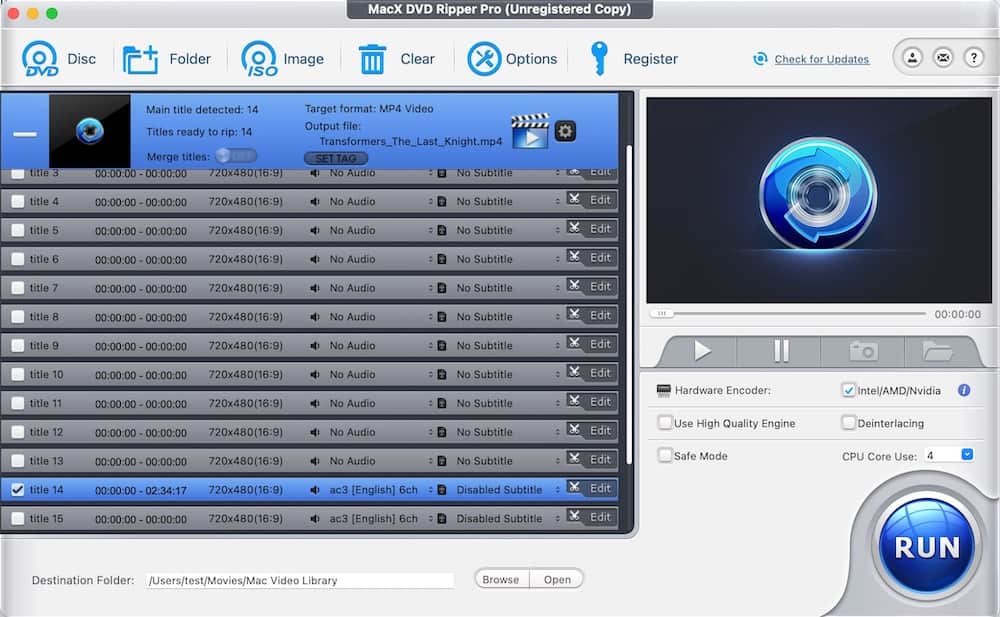
| MacX DVD Ripper Pro 6.9.0 | macOS 10.13+; Intel & native Apple Silicon; Tahoe 26 | CSS, region code, RCE, APS, UOPs, Sony ARccOS, RipGuard, Disney X-Project | MP4, MOV, MKV, MPEG, ISO image, DVD folder and more | Mac-focused ripping with video and backup-style outputs |
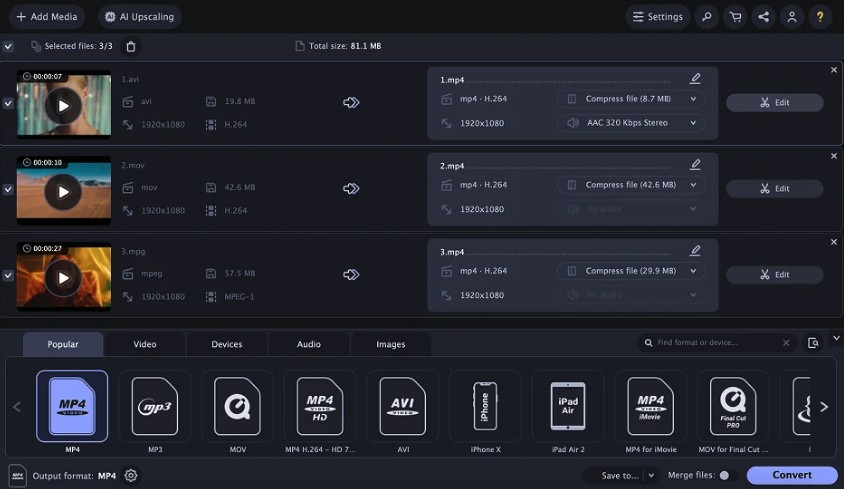
| Movavi Video Converter 2026 | macOS 12+; 64-bit Intel & Apple M1 or later | None | MP4, MKV, MOV, AVI and many other formats | Home-recorded and unprotected DVDs plus general video conversion |
Best DVD Rippers for macOS: Detailed Reviews
1. HandBrake 1.11.2: Best Free DVD Ripper for Mac
- Mac support: macOS 10.13 or later; Universal build for Intel and Apple Silicon; macOS Tahoe 26 supported
- DVD copy protection: None; HandBrake does not decrypt or circumvent protected DVDs
- Output formats: MP4, MKV, WebM
- Best for: Free conversion and compression of homemade, unprotected, or already-readable DVD sources
HandBrake is still where I would start when the DVD does not need decryption. Its real strength is encoding rather than disc access: H.264, H.265, and AV1 give me different ways to balance compatibility, file size, and encoding time, while audio, subtitle, chapter, filter, bitrate, and constant-quality controls make it much more flexible than a basic one-click converter. I normally conver MP4 when broad playback matters and MKV when I want more room for multiple audio or subtitle tracks. Because HandBrake always re-encodes video, I would not use it when the goal is to keep the original DVD video stream unchanged.

2. MakeMKV 1.18.4: Best for Preserving DVD Video and Tracks
- Mac support: Mac OS X 10.7 or later; x64 and ARM64 builds
- DVD copy protection: CSS; DVD structure protection and fake-title cases can be handled through its DVD opening modes and manual DVD mode
- Output formats: MKV only
- Best for: Keeping the existing DVD video, audio, subtitles, chapters, and metadata without another video encode
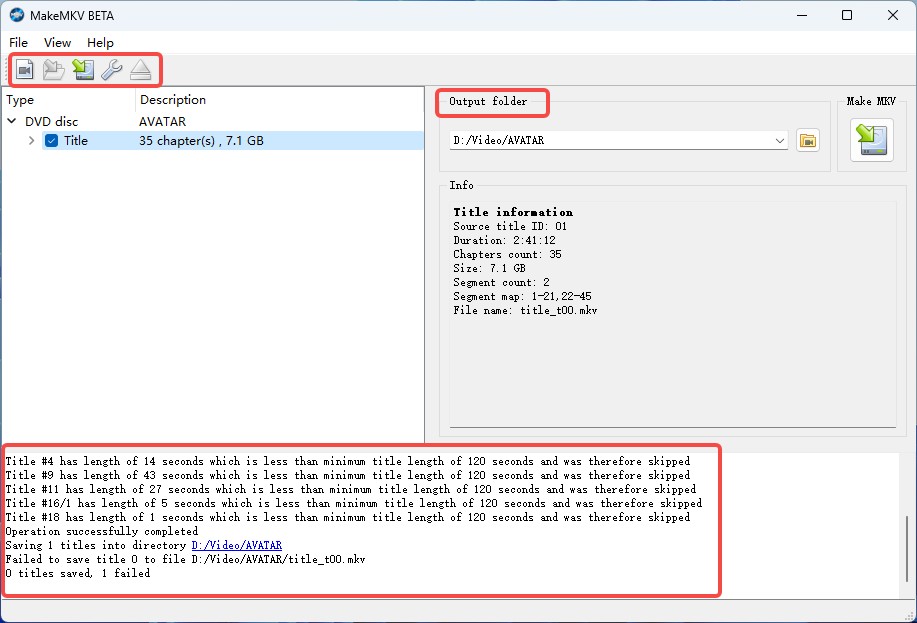
MakeMKV solves a different Mac DVD ripping problem from HandBrake. When I want to keep the existing DVD streams first and decide about compression later, an MKV remux is a cleaner starting point because the video is not encoded again. I can keep the main title together with the audio, subtitle, and chapter data I care about, then use that MKV as an archive file or feed it to HandBrake later for a smaller H.264 or H.265 copy. The tradeoff is storage and flexibility: DVD MKVs are usually much larger than compressed MP4 files, and MakeMKV does not offer normal MP4 output or a built-in video editor.
3. DVDFab DVD Ripper for Mac 13.0.6.3: Best for Protected DVDs and Flexible Output
- Mac support: macOS 10.10 or later, including macOS Tahoe 26; Intel and Apple Silicon
- DVD copy protection: CSS, RC/RCE, APS, UOPs, Sony ARccOS, RipGuard, Disney X-Project/99-title protection, and newer DVD protection schemes
- Output formats: MP4, MKV, AVI, MOV, WMV, FLV, MP3, AAC, M4A and many video, audio, and device profiles
- Best for: Commercial protected DVDs that need flexible MP4/MKV output, track selection, or further editing
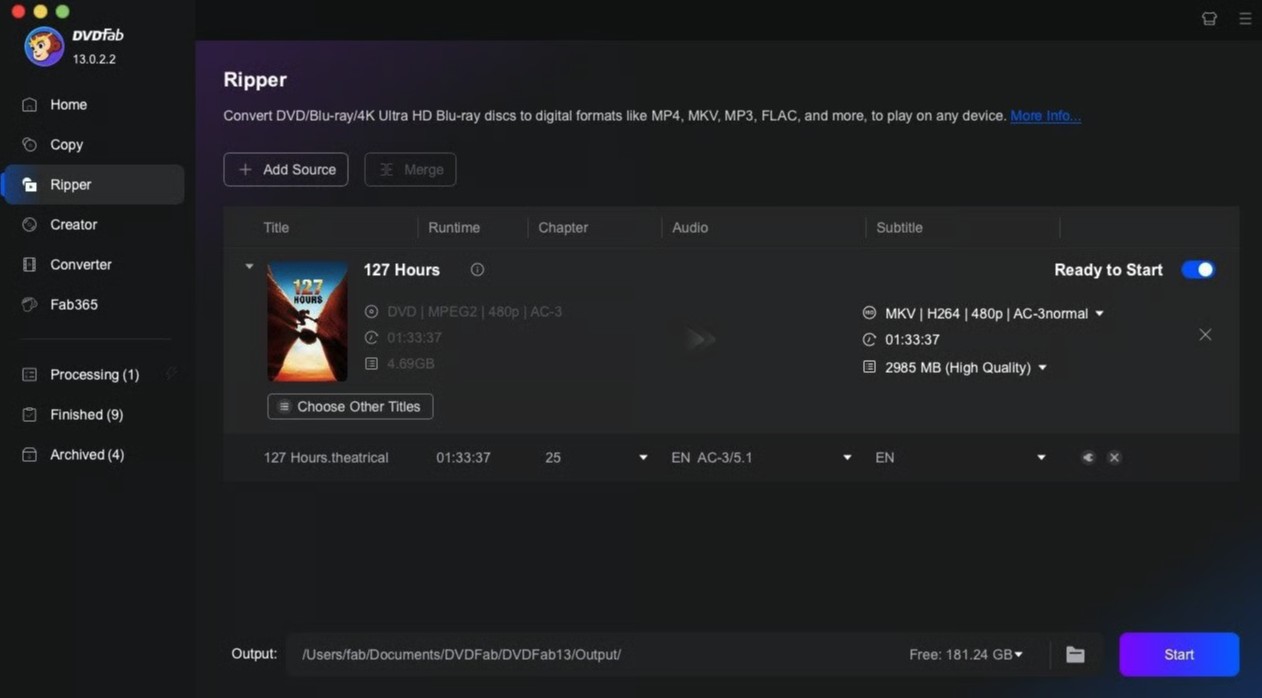
DVDFab DVD Ripper for Mac is the option I would move to when the limitation is the disc rather than the encoder. CSS and region coding are only the basic cases; ARccOS, RipGuard, UOPs, fake-title structures, and newer protections can make a commercial DVD harder for a general-purpose transcoder to interpret correctly. DVDFab combines that disc access with direct MP4 and MKV conversion, passthrough profiles, audio and subtitle selection, codec and resolution controls, device profiles, and a built-in video editor. For a protected movie DVD that ultimately needs to become a normal MP4, I prefer this type of all-in-one ripper to creating a large intermediate file and converting it in a separate program.
4. Cisdem VideoPaw 10.4.0: Best All-in-One Alternative for Current Macs
- Mac support: macOS 10.15 Catalina through macOS 26 Tahoe; Intel and Apple Silicon
- DVD copy protection: CSS, region code, UOP, RCE, Sony ARccOS, RipGuard, Disney X-Project, 99 fake titles, and bad-sector protection
- Output formats: MP4, MKV, MOV, AVI, WMV, WebM, TS, M2TS, audio formats, and device profiles
- Best for: Users who want protected-DVD ripping and general video conversion inside the same Mac application
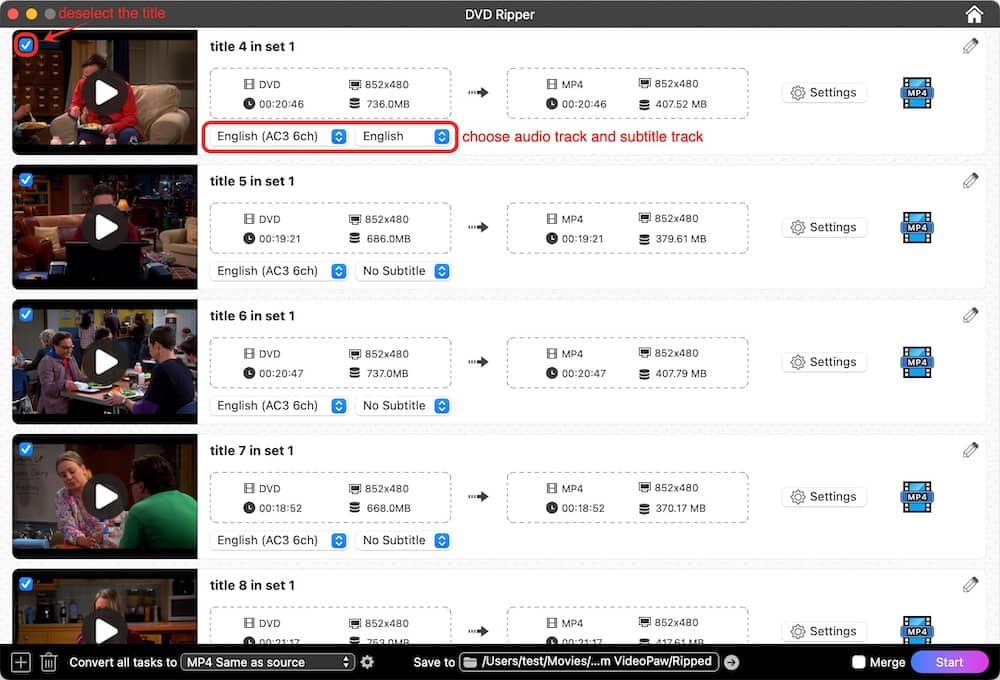
Cisdem Video Converter was renamed Cisdem VideoPaw, and version 10.4.0 adds full Apple Silicon support. I see it as an all-in-one media tool first and a DVD ripper second: it can deal with protected and homemade DVDs, but it also covers ordinary video conversion, compression, basic editing, audio extraction, and device-oriented output. That makes it useful when the same Mac handles more than disc work. For pure archiving, I would still choose MakeMKV when keeping the existing streams matters most, while a dedicated copy tool is a better fit when menus and the complete DVD structure must stay together.
5. MacX DVD Ripper Pro 6.9.0: Best Mac-Focused Alternative
- Mac support: macOS 10.13 or later, including macOS Tahoe 26; Intel and native Apple Silicon support
- DVD copy protection: CSS, region code, RCE, APS, UOPs, Sony ARccOS, RipGuard, Disney X-Project, and capacity/fake-title protection
- Output formats: MP4/H.264, MOV, MKV, M4V, MPEG, ISO image, DVD folder and additional video/audio profiles
- Best for: Mac users who want normal video output and backup-style DVD outputs in one dedicated DVD application
MacX stays more focused on DVDs than general-purpose converters such as Movavi, and version 6.9.0 adds native Apple Silicon support plus HEVC and AV1 options for DVD to MKV work. I would consider it when I want a Mac-first application that can move between a compact playback file and backup-oriented outputs such as an ISO image or DVD folder without switching programs. The important distinction is that those outputs solve different jobs: MP4 or MKV is better for everyday playback, while ISO or a DVD folder makes more sense when preserving disc structure matters.
6. Movavi Video Converter 2026: Best for Home-Recorded and Unprotected DVDs
- Mac support: macOS 12.0 or later; 64-bit Intel processors and Apple M1 or later
- DVD copy protection: None; protected DVDs cannot be converted
- Output formats: MP4, AVI, MKV, MOV and many other video/audio formats
- Best for: Home-recorded and other unprotected DVDs that also need conversion, compression, trimming, or upscaling
Movavi is a video converter that also accepts DVD sources rather than a commercial-DVD decrypter. That makes its role much clearer. For family recordings, training discs, home-video DVDs, or another unprotected VIDEO_TS source, the format presets, compression controls, trimming, subtitle options, and AI upscaling can all be useful after the disc has been read. I would not choose it for a region-locked or otherwise copy-protected movie DVD, because the program does not remove or bypass DVD copy protection.
How to Choose a DVD Ripper for Intel or Apple Silicon Macs
Start with the disc, not the software. A homemade DVD that opens normally gives you more free choices, while a protected commercial movie needs a ripper that can actually read the protection used on that disc. If the physical DVD does not appear in macOS at all, check the external optical drive, cable, power, and disc condition before changing conversion settings.
Next, decide what you want the finished file to do. To convert DVD to MP4 on Mac, H.264 is the safest general choice for playback across Macs, phones, TVs, browsers, and many media servers. MKV is more flexible when you want to keep multiple audio or subtitle tracks in one file. A MakeMKV-style remux keeps the existing video stream but usually results in a large file, while a HandBrake encode trades some of that file size for a newly compressed output.
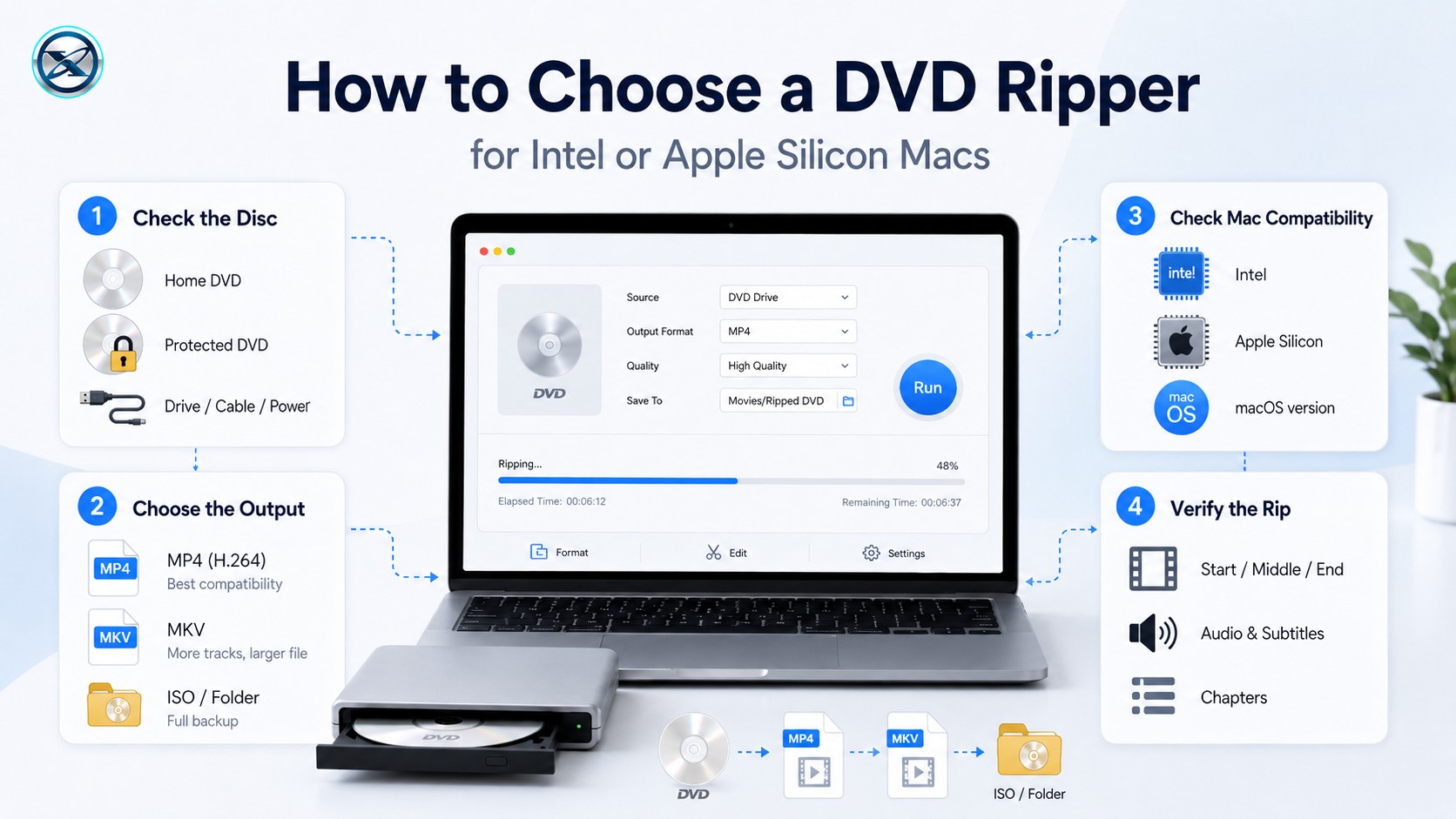
If menus, extras, and the original DVD structure matter, do not treat a normal MP4 or MKV rip as the same thing as a full-disc backup. Use an ISO or DVD-folder copy method instead. That distinction matters more than the number of output presets a program advertises.
The Mac itself is the final compatibility check. HandBrake, DVDFab, Cisdem VideoPaw, and MacX all cover current Apple Silicon hardware, while MakeMKV provides an ARM64 build. Movavi supports Apple M1 and later. Intel support remains available across all six choices, although their minimum macOS versions differ.
After the rip finishes, I reopen the file before putting the DVD away. I check the beginning, middle, and end of the movie, switch through the audio and subtitle tracks I intended to keep, and test chapter markers when they matter. A completed progress bar does not confirm that the output contains every track you expected.
FAQs
What is the best free DVD ripper for Mac?
HandBrake is the clearest fully free and open-source choice for an unprotected or already-readable DVD. It supports current Intel and Apple Silicon Macs and can create MP4, MKV, or WebM files. MakeMKV is another useful option when the priority is keeping the existing DVD streams in an MKV rather than compressing them immediately, but its beta is time-limited.
Which DVD rippers work on macOS Tahoe 26?
HandBrake, DVDFab DVD Ripper, Cisdem VideoPaw, and MacX DVD Ripper Pro support macOS Tahoe 26. MakeMKV also has a current ARM64 Mac build used on modern Apple Silicon systems. Always check the current product version before installing an older package from a third-party download site.
Do MacBook Air, MacBook Pro, Mac mini, and iMac need an external DVD drive?
Modern Macs normally do not include an internal optical drive, so a physical DVD usually requires a compatible external USB or USB-C DVD drive. The ripping application can only work after macOS and the drive can read the disc.
Can a Mac DVD ripper preserve the original DVD menu?
A normal MP4 or MKV title rip usually does not preserve the interactive DVD menu. If you want the menu, extras, and complete DVD structure together, use an ISO image, DVD folder, or full-disc copy method instead of a standard video conversion.
Conclusion
For an unprotected DVD, HandBrake is my first choice when I want a smaller playback file, while MakeMKV makes more sense when I want to keep the existing video and selected tracks without another encode. Those two tools cover many home-DVD and archive-first jobs without forcing the same workflow on every disc.
Protected commercial DVDs need a different class of software. DVDFab DVD Ripper combines broader DVD protection handling with MP4, MKV, passthrough, track controls, and editing, while Cisdem VideoPaw and MacX DVD Ripper Pro provide two other current Mac alternatives. Movavi is better reserved for home-recorded and other unprotected discs. Whichever tool you choose, reopen the finished file and check the audio, subtitles, and chapters before treating the rip as complete.
![Top 8 Best MP4 to DVD Converters on Windows & Mac [2026 Tested]](https://images.dvdnextcopy.com/2026/09/17/I2v69nzxIF6Xn7iue3ZRMGJ5-Ls0SF_z/feature_cover.jpg) Luna MillerSep 21, 2026
Luna MillerSep 21, 2026Top 8 Best MP4 to DVD Converters on Windows & Mac [2026 Tested]
 Luna MillerSep 21, 2026
DVD Region Codes Explained: Region 1 and Playback Options
![How to Remove DVD Copy Protection: Software and Free Methods [2026]](https://c.dvdnextcopy.com/media/How_to_Remove_DVD_Copy_Protection_d24c38a790.png) Steven VanceSep 21, 2026
Steven VanceSep 21, 2026How to Remove DVD Copy Protection: Software and Free Methods [2026]
 Luna MillerSep 21, 2026
How to Rip a Copy-Protected DVD on Win & Mac: 6 Ways
 Steven VanceSep 18, 2026
Top MP4 to ISO Converter in 2026: DVD Authoring vs Online Tools
 Steven VanceSep 18, 2026
How to Digitize DVD Collection: 5 Ways in 2026